 ePAL Global
CHAPTER 01Introduction to Cross Border Calculator
1.1What is Cross Border Calculator by ePAL?#
ePAL is a cross-border pricing and compliance specialist. Its Shopify app, Cross Border Calculator by ePAL, helps merchants prepare international product prices that include applicable product import taxes and customs duties.
This guide covers the Basic version of Cross Border Calculator. It is available across Shopify's store-plan tiers because it uses Shopify's native product, Market and Catalog pricing capabilities instead of relying on changes to the live checkout. That makes it accessible to more merchants, but it also creates a practical limit: prices are calculated in advance, product by product and country by country, not dynamically for the contents of each basket and its shipping arrangements.
With Cross Border Calculator, you can calculate the landed-cost impact for every relevant product and supported destination country, examine the individual tax and duty components, choose what to charge and publish your chosen prices into Shopify. Customers see the resulting price for their destination rather than discovering product import charges for the first time at delivery.
Cross Border Calculator does not take over your Shopify checkout or payment processing. Shopify continues to handle selling, customer currencies, shipping charges, payments and orders.
1.2How Cross Border Calculator works with Shopify#
The following is the typical process. You can save your progress and return later; there is no need to complete setup in a single session. Until you approve the final publication step, Cross Border Calculator will not change your live product/Market prices in Shopify.
- Connect your store. Install Cross Border Calculator, link or create an ePAL account, and approve the subscription through Shopify. Existing Shopify products, Markets and Catalogs can be imported or reused rather than rebuilt.
- Classify your products. Import the available product descriptions and other facts from Shopify, check the suggested HS6 (six-digit, internationally harmonised) codes, and correct or enrich the details where needed. The HS6 code is the starting point, not the final tariff code for every destination. The classification guidance explains how the ePAL portal can help with difficult products.
- Price your products. Confirm the source-country selling price, any domestic tax already included, origin and dispatch information. ePAL can remove included domestic tax when sufficiently accurate data is supplied, then calculate country-specific duty and destination tax. The pricing inputs matter because even small source-data differences can significantly change the final price.
- Choose your countries and pricing approach. Use existing or new Shopify Markets. Choose a single international price, a price for each destination or groupings such as a common EU price; you can also override individual suggested prices.
- Calculate and review. See the suggested product price and its duty and tax components in your familiar Shopify store currency. Recalculate as often as you wish while subscribed, without additional classification or calculation charges.
- Resolve conflicts and publish. Resolve any competing Shopify Market/Catalog price rules, confirm tax and duty checkout settings, and deliberately publish the chosen prices. Your existing live prices remain unchanged during the draft stages.
- Test and sell. Verify example destination storefronts and checkouts, including shipping and any non-product costs. Shopify handles any customer-facing currency conversion and the payment transaction.
The same process can be repeated in a few clicks when domestic selling prices, product information or destination tax and duty rules change. Cross Border Calculator will not silently publish recalculated prices.
1.3What is included with ePAL Basic?#
Included with ePAL Basic are the core capabilities for pricing products across international destinations:
- Import existing Shopify content: Work from your existing product descriptions and applicable Market/Catalog information instead of entering everything again.
- HS6 product classification: Generate and review generic six-digit classifications, using the portal's more detailed HS6 assistance where required.
- Product and destination calculations: Apply relevant product customs duties and import taxes using country-specific tariff classifications derived from the HS6 starting point.
- Domestic-tax handling: Where you supply the relevant tax-inclusive price and rate, remove domestic tax before calculating the destination price.
- Flexible merchant pricing: Use the suggested calculated price, choose a higher or lower selling price, apply a common price across countries or a regional group, or set separate prices by country.
- Market/Catalog price management: Review applicable existing Shopify price rules, identify conflicts, and publish selected prices into supported Shopify Markets.
- Easy repricing: Recalculate product-country prices whenever source prices or rules change, then decide what to publish.
- Reporting and further analysis: Use Liability Check and Report inside Cross Border Calculator in Shopify Admin. Use the separate ePAL Portal for transaction analysis.
There is no extra ePAL charge for classifying or reclassifying products, calculating or recalculating prices, adding supported product-country combinations or publishing revised prices while the subscription remains active. The usage charges apply to qualifying completed sales, not to the work needed to prepare prices.
1.4What is not included with ePAL Basic?#
Not included with ePAL Basic are the capabilities that depend on information or checkout control that this version does not have:
- Dynamic shipping rates in ePAL calculations. Shipping costs that depend on the complete basket, quantities, carrier or delivery address are not available when a product-country price is precalculated. Shopify continues to manage shipping and delivery charges.
- Live basket-specific landed-cost recalculation. The published product price is prepared in advance; ePAL Basic does not revise the price dynamically at checkout after the complete basket is known.
- Basket-level IOSS validation. ePAL Basic does not determine IOSS eligibility for an individual Shopify basket or confirm that a particular order meets IOSS thresholds or conditions.
- Revalidation in the Shopify plugin. The Basic app does not offer a fulfilment-stage order-revalidation action. Additional order information and other tools may be available separately in the ePAL portal.
- Customs brokerage and remittance. The app does not submit declarations or pay import charges to customs authorities or carriers on your behalf.
These limits come primarily from the Shopify checkout approach used by the Basic version, not from a general inability of ePAL to calculate more complete landed costs. They are important when deciding what you can promise your customers about delivery-inclusive pricing.
1.5How much does ePAL Basic cost?#
The ePAL Basic Shopify subscription is USD $79 per store per monthly billing period, with 100 qualifying ePAL-priced baskets included. Each additional qualifying basket in the same period costs USD $1. Shopify manages these subscription and usage charges.
Your monthly subscription includes unrestricted eligible product classification, reclassification, price calculation, repricing and price publication. You do not pay an ePAL fee merely because a customer views a product, places items in a basket or abandons checkout.
A qualifying basket is counted once when a completed eligible cross-border Shopify sale is proven to have used an ePAL-published price on at least one purchased product line. Later cancellation or refund does not automatically reverse the charge. See Pricing, Usage and Billing.
1.6Who is responsible for what?#
ePAL, the vendor, supplies classification assistance, duty/tax intelligence, calculated pricing and relevant reporting through Cross Border Calculator and the ePAL portal.
Shopify supplies your store, Markets and Catalogs, storefront, checkout, customer-facing currency conversion, payment processing, orders and shipping-rate configuration.
You, the merchant, decide which products and countries to cover, provide accurate source prices and product facts, approve the selling prices, configure and test Shopify to prevent duplicate tax/duty charges, and make the relevant import, customs-clearance and delivery arrangements. You are also responsible for checking whether the final amount collected covers all the costs you have agreed to pay on the customer's behalf.
This division of responsibility matters particularly for merchants advertising a fully landed or delivery-inclusive price: it is achievable where the merchant makes provision for shipping, handling and other costs, but the pre-calculated product price alone is not a carrier or customs-clearance instruction.
CHAPTER 02Installation and Initial Setup
2.1Before you begin#
You need a Shopify store, permission to install apps and manage Markets and product prices, and authority to approve Shopify app billing. You can sign in to an existing ePAL account or create one during installation.
You do not need to start from scratch. Cross Border Calculator can use existing Shopify products, descriptions, Markets and Catalog information. During setup, review what the app imports and adjust only the information or configuration that needs attention.
For your first group of products, it helps to know the intended destination countries, selling price in the product's source country, whether that price already contains domestic tax and at what rate, country of manufacture/origin, and likely ship-from location. Better inputs lead to more reliable classifications and better price calculations; not every fact needs to be entered manually when it is already in Shopify.
Check existing Markets and prices. Shopify can have more than one applicable Market or Catalog pricing rule for a product in the same country. Where equally applicable Catalog prices compete, Shopify can select the lower price, defeating the purpose of an ePAL price that includes import taxes and duties. ePAL strongly recommends that a product is not offered to the same country through two separately priced Shopify Markets.
You can stop and resume the setup at any stage. Draft classifications, calculations and decisions are saved; live product/Market prices are not changed until you approve publication. Installing the app and approving the subscription are separate Shopify actions that take effect when you authorise them.
2.2Install and connect Cross Border Calculator#
- In the Shopify App Store, find Cross Border Calculator by ePAL and choose the correct Shopify store.
- Review the permissions requested by Shopify and approve installation with an authorised account.
- Open Cross Border Calculator from the Shopify admin. Sign in to your ePAL account or create one.
- Confirm the connected Shopify store, especially where you administer more than one store under the same ePAL login.
- Review the ePAL Basic terms and approve the USD $79 monthly subscription and qualifying-basket usage pricing through Shopify.
- Return to the app and confirm its connected-store and subscription status.
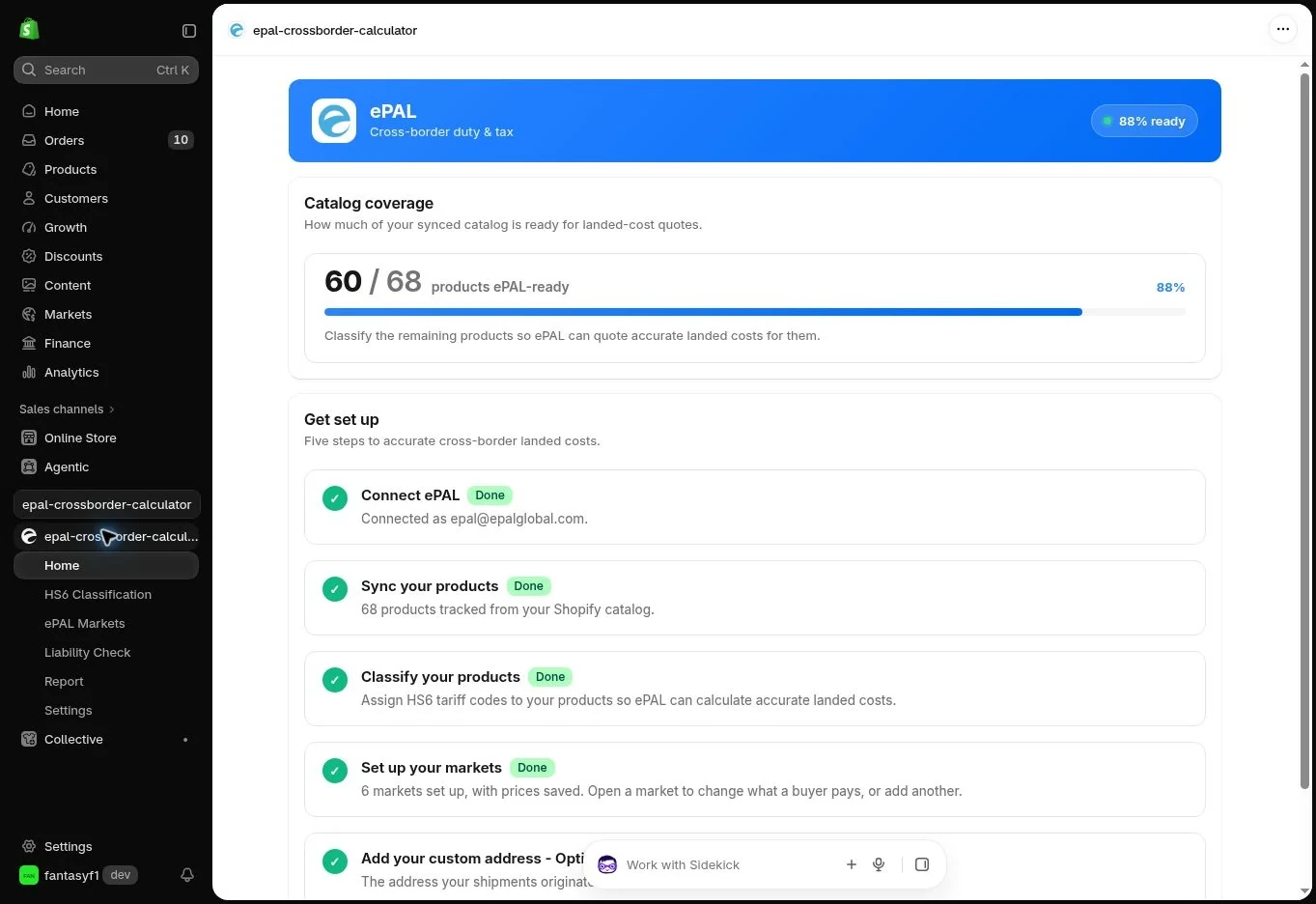
- Review the existing products, Markets and Catalogs identified or imported by the app and begin your saved draft configuration.
If you leave or decline a Shopify subscription approval screen, check the subscription status before proceeding. Your store's billing and permissions are managed by Shopify; ePAL will not ask you to enter payment-card details in the app setup flow.
2.3Configure your first products and destinations#
Begin with two or three representative products, preferably including one product with a domestic tax-inclusive price and another with a different classification, origin or dispatch arrangement.
- Classify the selected products using existing Shopify descriptions, review the proposed HS6 codes and enrich the information in the ePAL portal if a code is uncertain.
- Price each product by confirming its domestic selling price, included tax information, origin, dispatch and destinations. Review the separated duty and destination-tax components.
- Decide whether to use the calculated amount or override it, and whether the same or different selling prices should apply across destinations or a group of countries.
- Review warnings about existing Shopify prices. A product sold to the same destination through another independently priced Market is a particular risk.
- Follow the app's Shopify tax and duty configuration guidance, then publish only when you are satisfied with the prices and arrangements.
Your work is saved if you leave the app before publishing. You can return to complete the configuration without affecting current live product prices.
2.4Verify the storefront before selling#
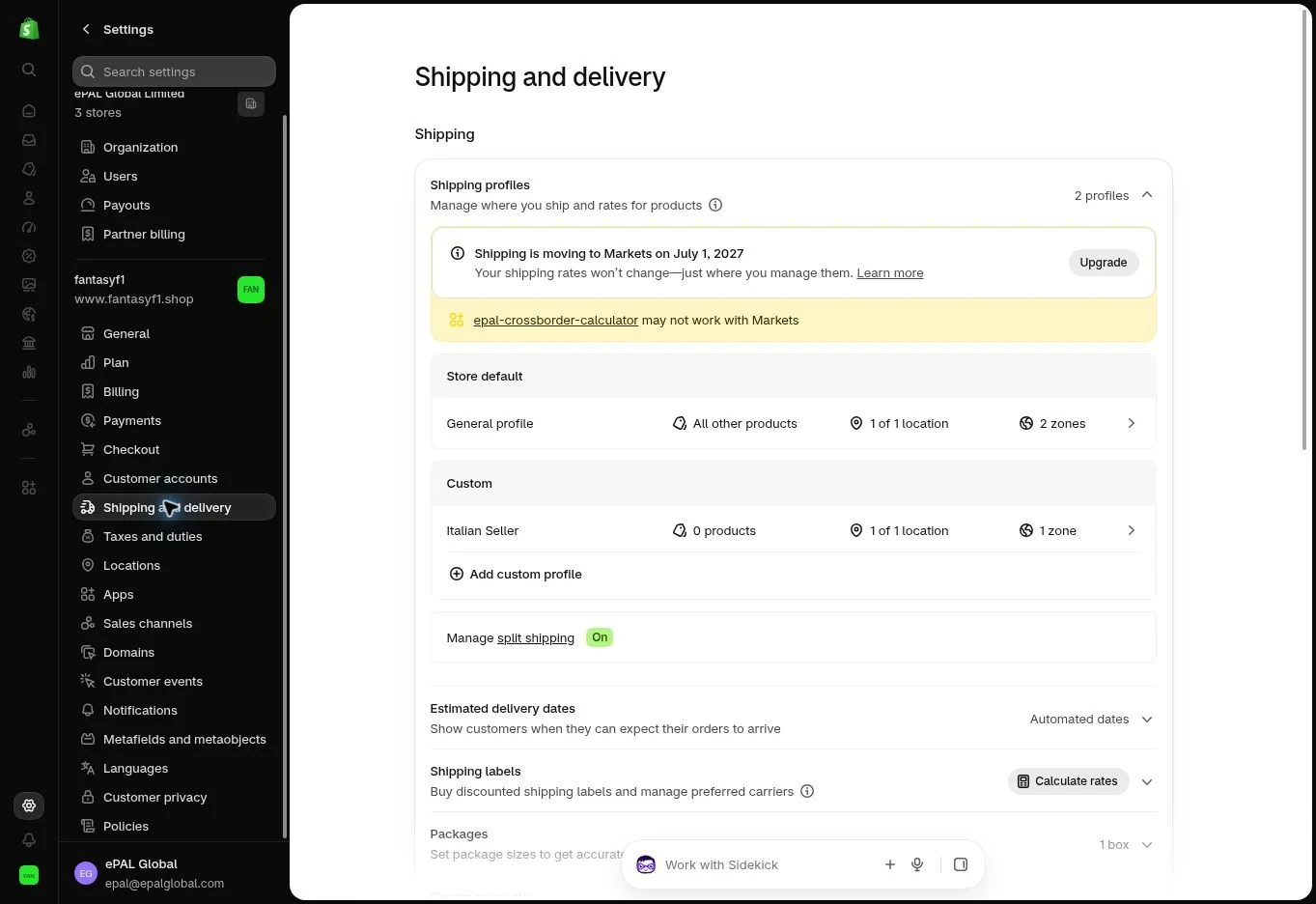
The Shopify tax, duty and shipping setup is an essential part of installation. The app's precalculated product prices already include selected import duty and product tax amounts; leaving Shopify configured to add those same components again can lead to overcharging customers. Conversely, disabling unrelated tax settings could affect domestic sales or uncovered products.
After following the app's configuration instructions, test a complete route:
- Select a destination country for a product whose ePAL price was published.
- Confirm the product and variant price and Shopify's display currency.
- Add the product to the basket and inspect any discounts.
- Continue to checkout and check that the same product tax and customs duty have not been added a second time.
- Inspect shipping, handling and carrier-related charges separately, including their tax treatment.
- Test a second country and an uncovered domestic product to confirm that unrelated Shopify pricing continues to work.
- If your store uses a cart drawer, accelerated checkout or third-party price/discount app, repeat tests for the actual purchase routes customers use.
A successful price calculation is not enough: the effective storefront and checkout price is the test that matters. Keep an example of the expected and observed amount for future comparisons.
2.5Development and test stores#
Test on a Shopify development store where practical, especially when you are changing taxes, Markets or Catalog prices. Development/partner-store access can follow the configured free-testing arrangement; this is separate from the production subscription and not an introductory production trial.
When test checkout or billing features are available, use safe test orders and avoid real customer payment information. Different Shopify plan levels, discount plugins and purchase routes can behave differently, so test the combinations you intend to offer.
2.6Initial setup checklist#
Before you publish live prices, confirm the following:
- Cross Border Calculator is connected to the intended Shopify store and subscription.
- Existing product descriptions, Markets and Catalogs have been imported or reviewed; you have not needlessly rebuilt them.
- Each chosen product has an appropriate HS6 starting point and enough data for its destination-country calculation.
- Source price, included domestic tax, origin and ship-from assumptions have been checked.
- You have selected the countries, regional groups and any price overrides you want.
- Overlapping Market/Catalog price authorities have been resolved.
- Shopify is configured not to double-charge product import duty or tax, while preserving necessary unrelated charges.
- Live publication has been approved, and storefront-to-checkout tests have passed for representative products, destinations and purchasing routes.
CHAPTER 03Configuring Cross Border Calculator
3.1Store defaults and product-specific settings#
Use store-level defaults when products share a typical dispatch location and tax treatment, with product-specific overrides where the facts differ. ePAL can import the information available in Shopify, including product and location information, rather than asking you to duplicate it.
Where a product could ship from several countries and the actual dispatch country is not known when its international price is published, there is no perfect single calculation. You have three practical options:
- Use the most likely dispatch country. A reasonable default keeps the product on sale but may occasionally produce an over- or under-estimate.
- Sell without an ePAL-precalculated destination price. The product can still be sold through ordinary Shopify arrangements, but duty and import tax may be collected separately before dispatch or at delivery, depending on your shipping terms.
- Use conservative pricing. Price against the highest reasonably anticipated duty and tax exposure for the relevant destination so that the expected cost is covered. This can mean some customers pay more than the exact amount applicable to their shipment. It reduces foreseeable undercollection risk but cannot guarantee that every unexpected charge or customs decision is covered.
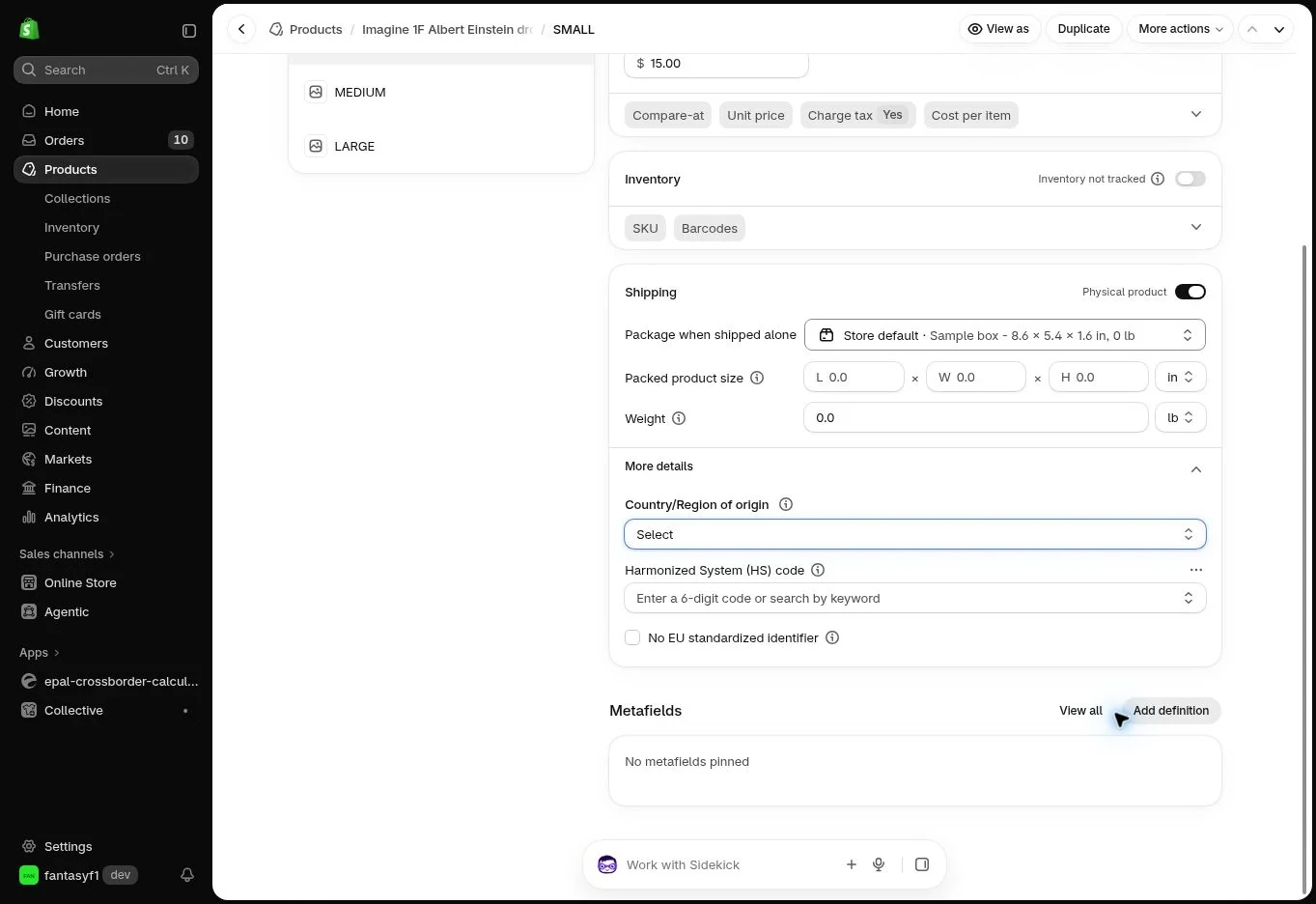
Choose the approach that fits your fulfilment arrangements and customer promise; document any assumption you use. Country of customs origin and the country from which the goods are dispatched are different inputs.
3.2Classify your products using HS6#
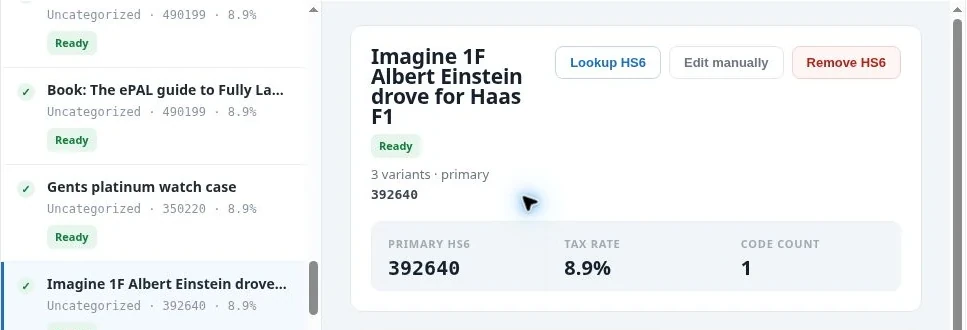
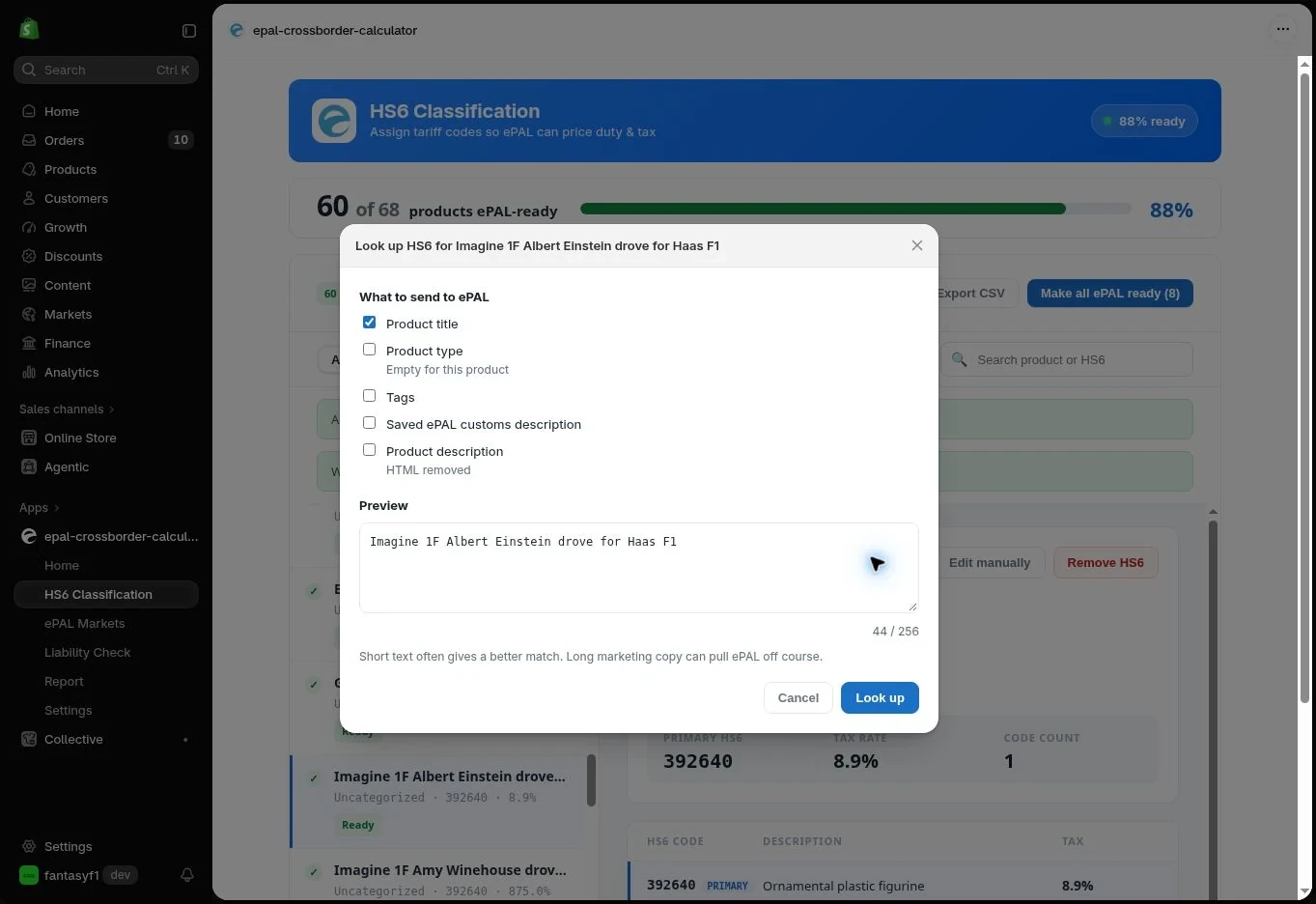
Cross Border Calculator starts from a product's Shopify description and other available details, then suggests a six-digit HS6 classification. The HS6 code is an internationally harmonised starting point, not a destination-country tariff code. When ePAL retrieves duties and taxes for a given country, it uses that HS6 starting point and the relevant product information to obtain the country-specific, longer classification that may be required.
A title such as “jacket” may not contain enough information to distinguish textile material, construction or use. Review the suggested code, correct inaccurate product facts and supply relevant composition, manufacture, origin and function details. Different variants can require different treatment.
More detailed HS6 lookup in the ePAL portal. Where the Shopify listing does not contain enough information for a confident suggestion, the ePAL portal offers more flexible classification assistance. You can enter extra information there to improve the suggested HS6 code without modifying the customer's Shopify product listing. That assistance is available under your subscription without a separate classification fee.
The merchant remains responsible for the accuracy of the product facts and the classification ultimately accepted. For uncertain or high-risk products, keep supporting evidence or obtain appropriate specialist advice.
3.3Source prices, domestic tax and currency#
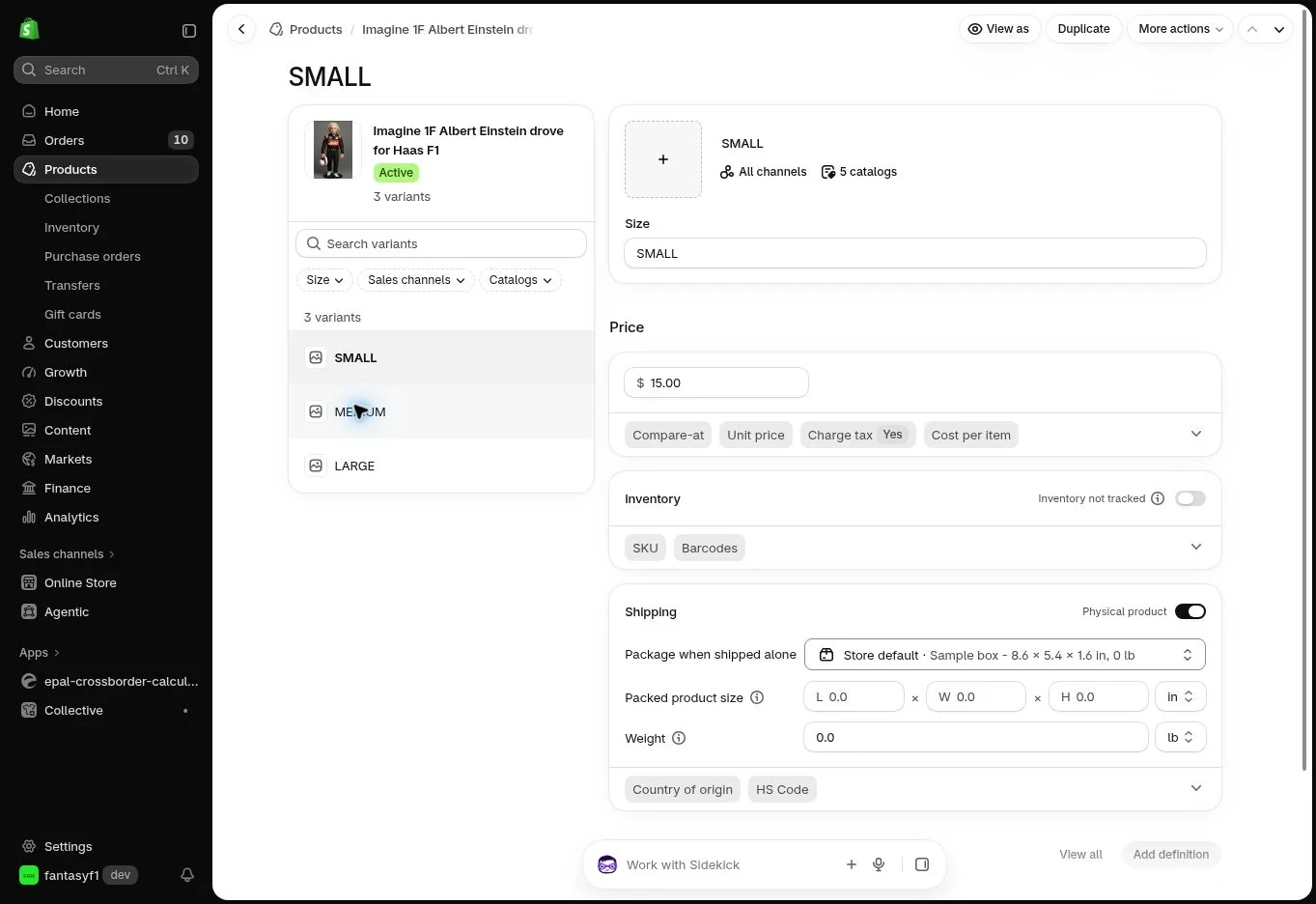
The Shopify base price is the price at which the product is sold in the merchant's or product's source country, not necessarily an internationally tax-exclusive price. Cross Border Calculator uses that familiar domestic price as its starting point.
Where the source price includes a domestic VAT or sales-tax amount and you supply the correct rate and treatment, ePAL can remove that domestic tax before adding the destination-country tax and customs duty. This can materially reduce the resulting international price compared with simply adding foreign tax to a domestic tax-inclusive figure.
For example, a source-country price of €123 including 23% domestic VAT contains €100 before domestic VAT. When the relevant sale is treated on a tax-exclusive starting basis, ePAL can use €100 rather than €123 before adding applicable import duty and destination tax. This is an example of the arithmetic, not a statement that domestic VAT is always removable for every sale.
Check whether each relevant product price is tax-inclusive or tax-exclusive and supply an appropriate included tax rate, particularly where products have different domestic tax treatments. A mistaken included-tax setting can have a large impact on every destination price.
Calculation currency: ePAL deliberately shows and calculates product-country prices in your Shopify store currency, even when customers later buy in another currency. This allows you to compare duty and tax effects in a familiar currency. Shopify or your payment service provider handles customer-facing foreign-exchange conversion and payment settlement; ePAL does not change your payment-processing arrangements.
3.4Countries, regional pricing and IOSS#
Choose target countries individually or through existing Shopify Markets, and review whether each is supported for your products and trade routes. You can apply one common selling price across multiple countries, a different price for each country, or regional groupings, such as one price for an EU group and separate prices elsewhere. A common published price may be higher than the calculation for some destinations; that is a deliberate merchant pricing choice.
Import duty and destination tax are determined using the product's tariff classification, customs origin, dispatch facts and applicable destination rules. Values and thresholds can matter, so a precalculated product price is not the same thing as evaluating a completed basket.
IOSS limitation: EU Import One-Stop Shop arrangements may be relevant to particular imports, but ePAL Basic does not assess IOSS eligibility or threshold compliance for an individual Shopify basket. You and your advisers/carriers remain responsible for deciding when IOSS may properly be used and how the corresponding tax is accounted for.
Your chosen DDP or DAP delivery terms remain separate from the publication of an ePAL product price. A price can include a cost allowance without itself causing a carrier to collect or remit the relevant duty or tax.
3.5Avoid overlapping Shopify and ePAL calculations#
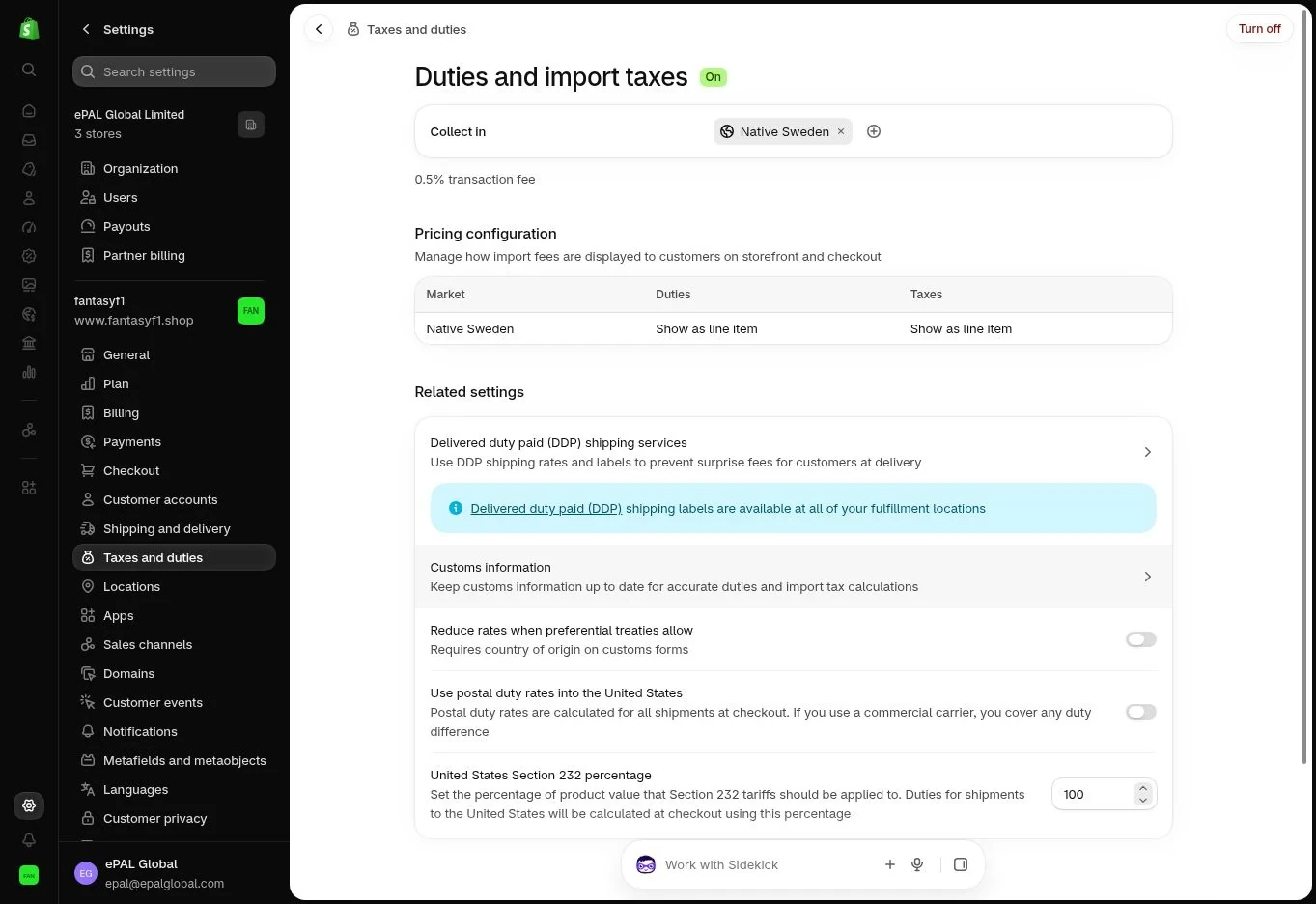
Follow the configuration instructions shown by Cross Border Calculator for the markets you are covering. In particular, check that Shopify's native tax/duty settings or another tax app do not add the same product import taxes or duties again when those amounts are already included in an ePAL-published price.
Preserve any Shopify calculation still needed for domestic sales, non-ePAL products and shipping, including shipping taxes where applicable. There is no safe universal rule to disable all taxes throughout the store.
Avoid overlapping independently priced Shopify Markets for the same product and destination. Where Shopify compares equally applicable Catalog pricing paths, a lower competing price can be displayed instead of the intended ePAL price. Review and resolve the app's conflict warning before publishing. See Managing products, Markets and prices.
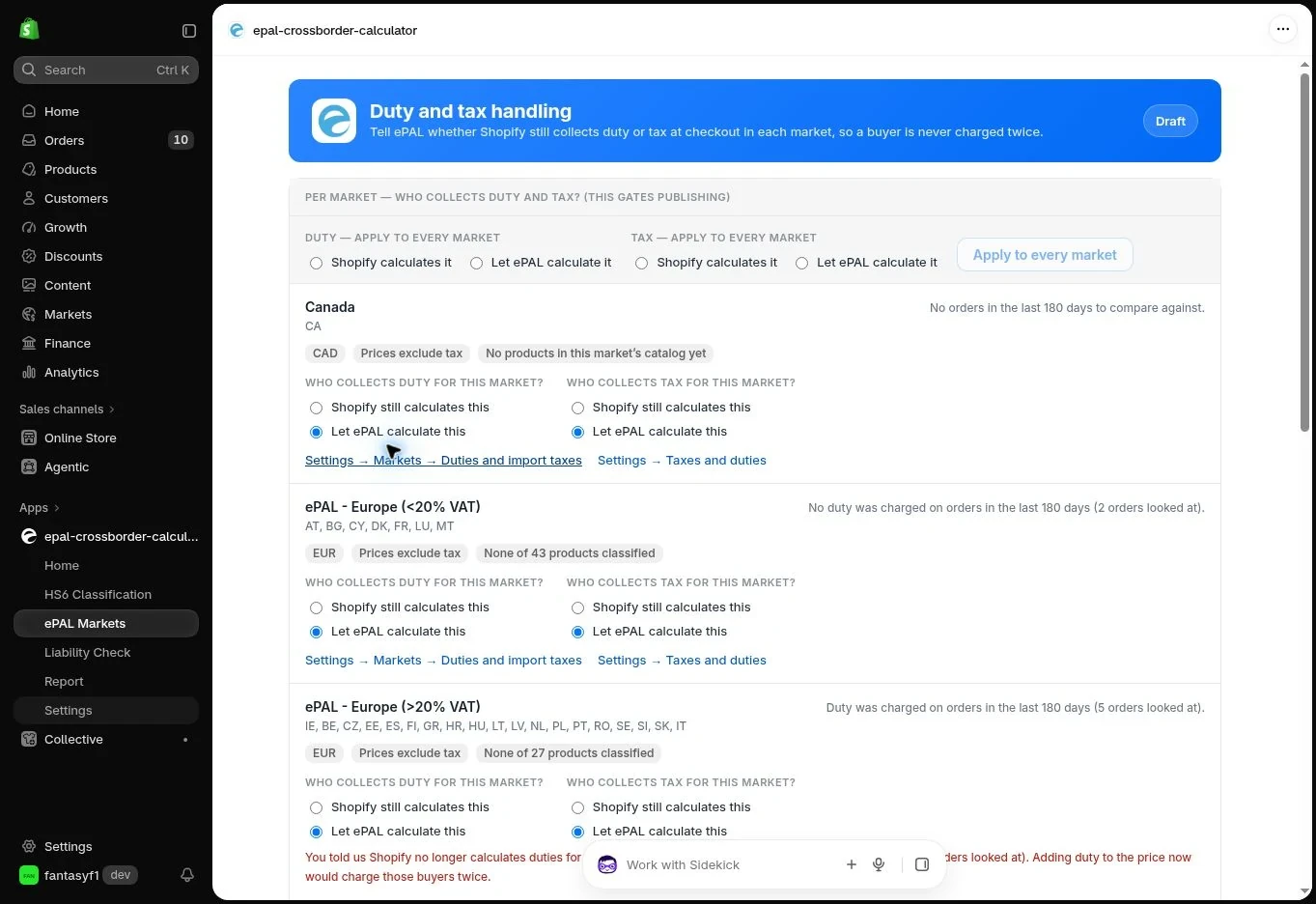
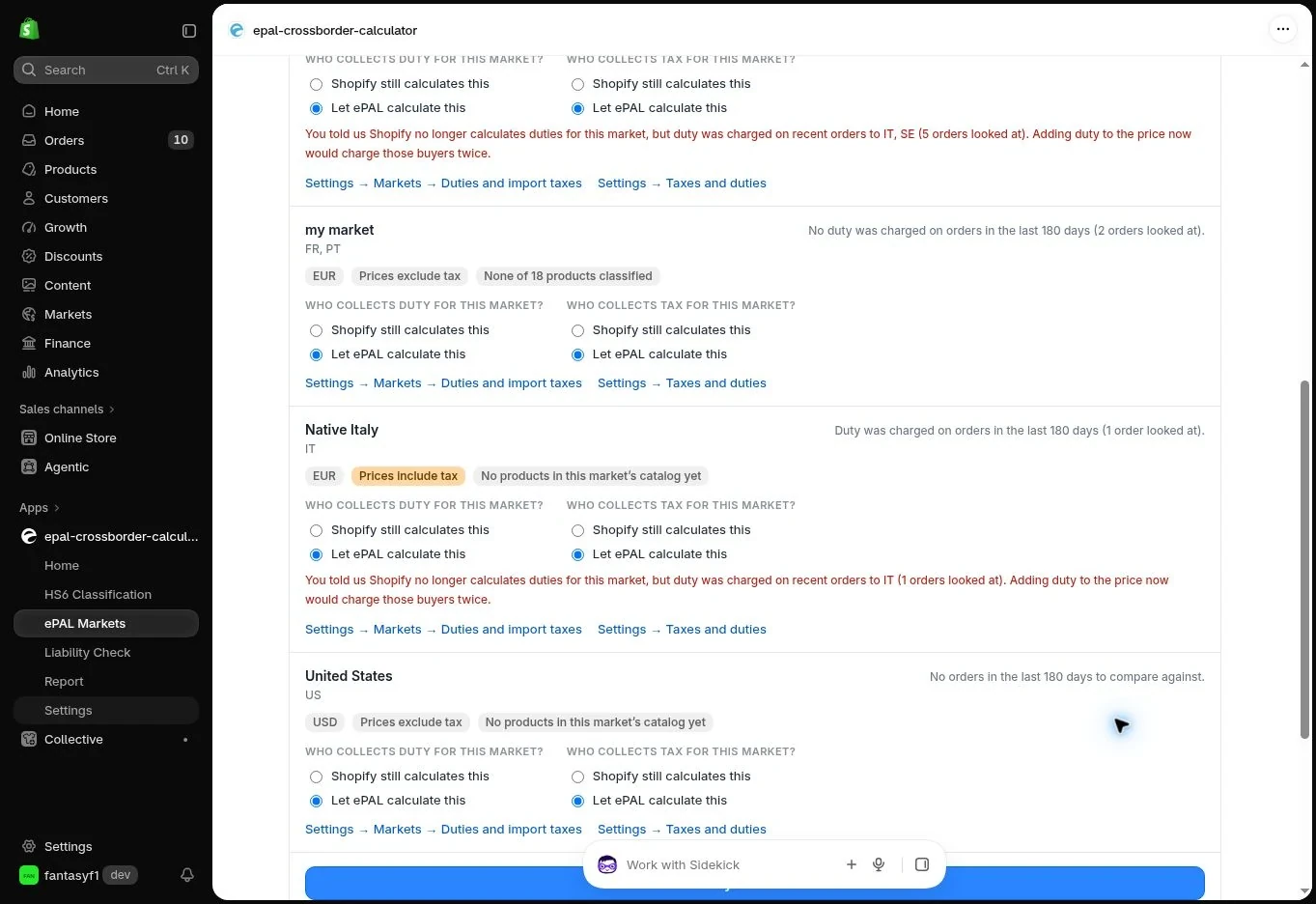
In the app, open Settings → Duty and tax handling to review who collects duty and tax for each market. Check the corresponding Shopify settings as well. Recent-order comparisons can flag a potential double collection; investigate the warning before changing your answers or publishing.
3.6Save your progress and reprice#
You can stop setup, return later and continue from saved progress. Draft product information, HS6 decisions, proposed prices and Market decisions are retained without silently changing live customer prices.
After the first publication, you can revisit any product, correct facts, change its source price or revise your international strategy. Cross Border Calculator can then recalculate the relevant country prices in a few clicks. Review and deliberately publish the revised values; recalculation does not automatically change the storefront.
There is no separate fee for reclassification, repricing or republication while your monthly subscription remains active. A regular, for example weekly, pricing review is a practical way to keep published values current.
CHAPTER 04Managing Products, Markets and Prices
4.1Choose products, countries and pricing strategy#
Select the products and countries for which Cross Border Calculator will provide precalculated prices. The app can work with Shopify products, Markets and Catalogs already set up by the merchant, and it can help you create new coverage where necessary.
For each product and target country, choose whether the selling price will be ePAL-calculated, manually overridden or managed through existing Shopify pricing. The app can support a common landed selling price across several countries, individual country prices, or regional combinations, such as a shared EU price with country-specific exceptions.
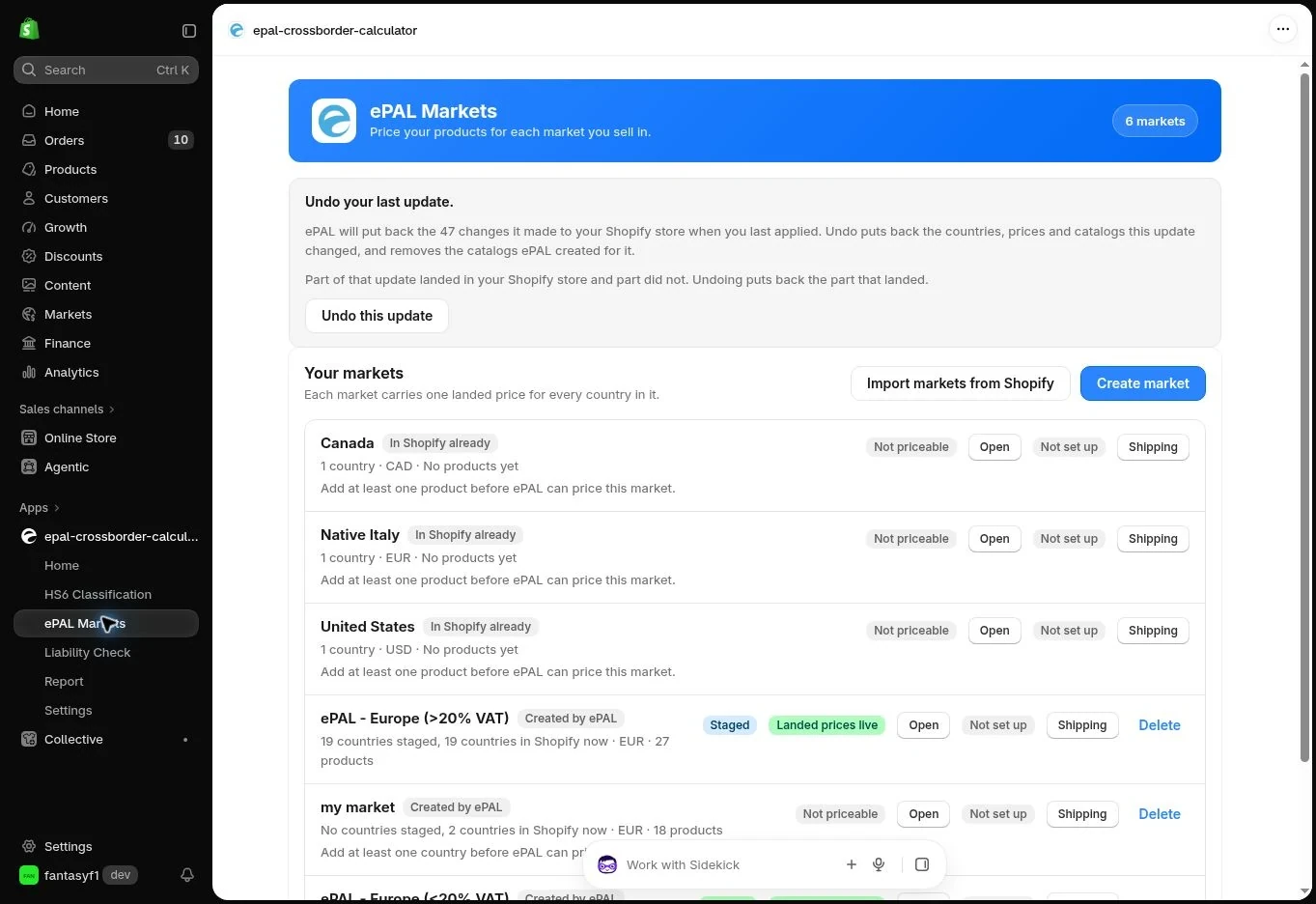
Strong recommendation: avoid offering one product to the same country through two different independently priced Shopify Markets. Shopify permits overlapping configurations, but the customer can see a different, potentially lower price than the one intended to cover tax and duty.
4.2Calculate, compare and override prices#
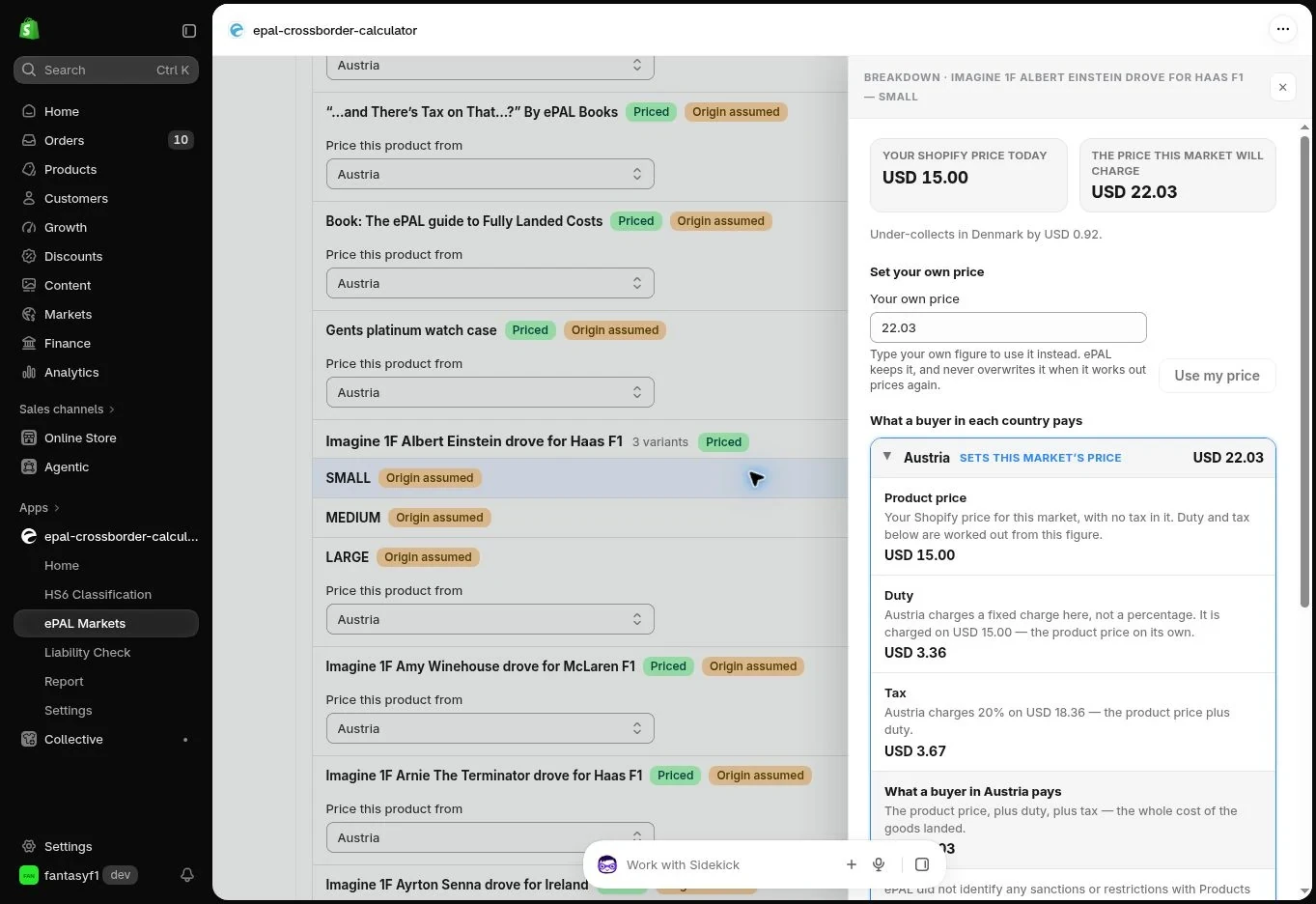
For each selected product and destination, Cross Border Calculator shows the source-country starting price and the proposed import duty and destination tax components, expressed in the Shopify store currency. The underlying country-specific classification is derived using the accepted HS6 starting point.
The suggested price is not mandatory. You can publish the fully landed price calculated by ePAL, choose to charge more to provide a margin or reserve for other costs, or choose to charge less as a commercial decision. You can also hold a common price across a region or calculate distinct amounts country by country.
If you charge less than the calculated landed amount, the difference does not eliminate any tax or customs liability. You remain responsible for paying what is actually owed under the chosen import arrangement. Similarly, charging more does not mean a customs authority will accept that amount as the declared value or as evidence of tax payment.
Calculated prices are proposals until you approve publication. You can recalculate prices as often as needed, without separate re-pricing charges.
4.3Understand Shopify Market and Catalog conflicts#
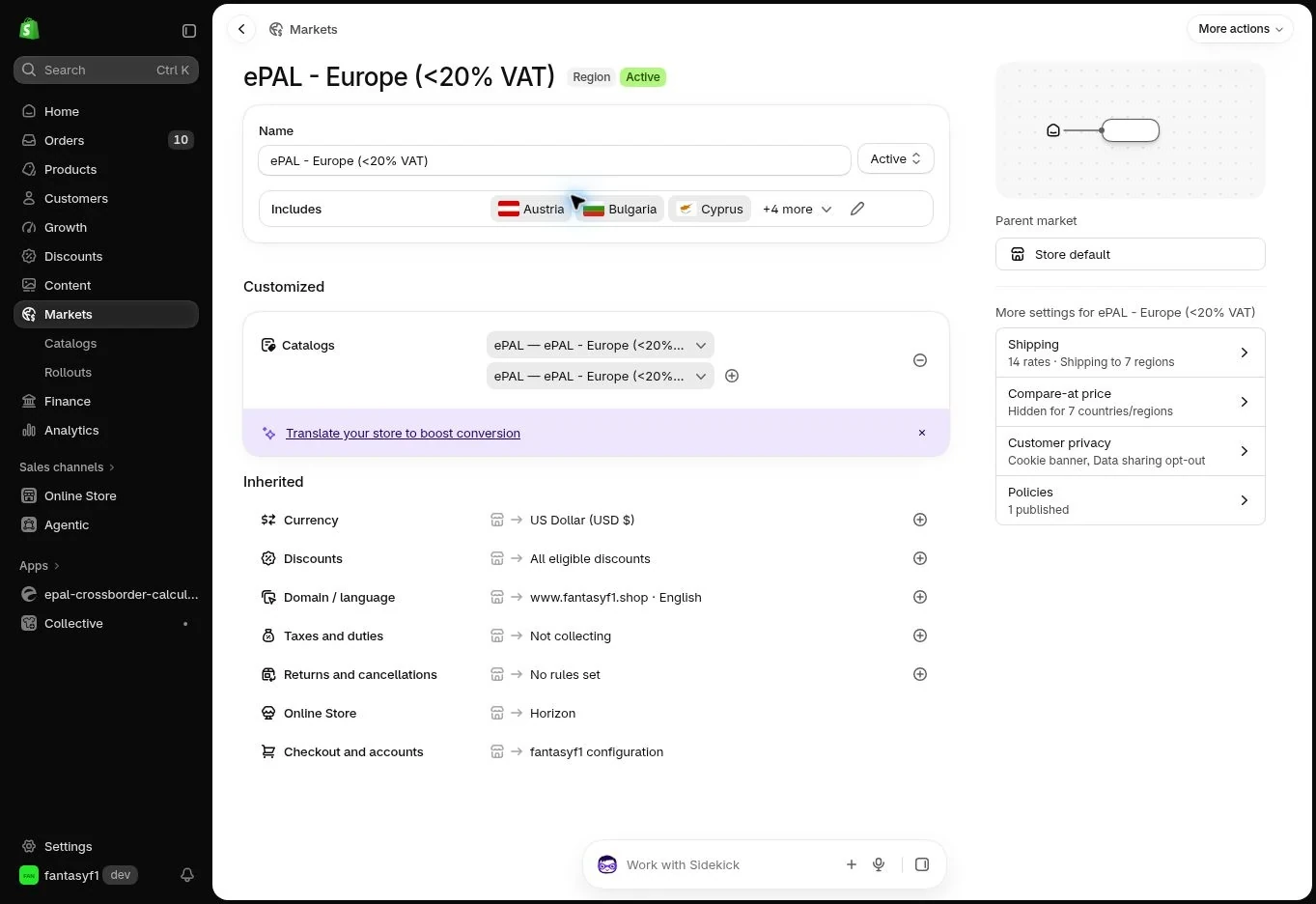
Shopify uses Markets, Catalogs and price lists to decide which price to present for a buyer context. Cross Border Calculator reviews existing pricing, including prices that have already been set for products in the countries you want it to cover.
If the same product is available to the same country through separate independently priced Markets or Catalog rules, Shopify may resolve a lower competing price, especially where the pricing paths are equally applicable. A customer might therefore see a normal source price, or another country price, instead of the ePAL-published price with customs duty and import tax built in.
For this reason, ePAL strongly recommends that the same product is not sold to the same country through two separately priced Shopify Markets. A product appearing in multiple Catalogs for publication alone is not always a conflict; the critical problem is two eligible price authorities.
When the app identifies a possible conflict, review the named product, variant, country and Shopify pricing path before deciding which price should be active.
4.4Resolve pricing conflicts#
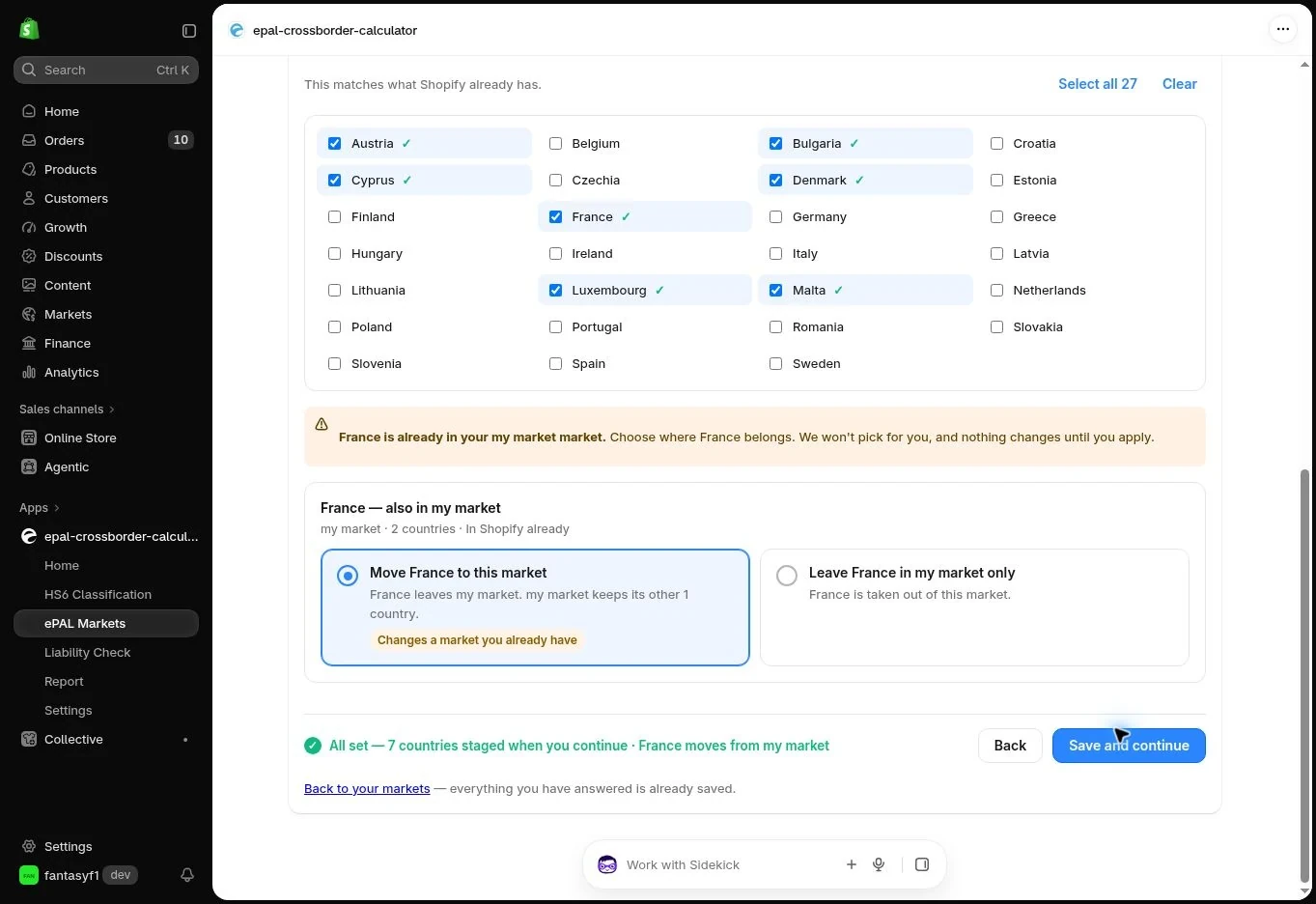
When a price conflict is identified, Cross Border Calculator offers the merchant a decision about which pricing arrangement to use:
- Use the ePAL calculated or chosen price. Review the existing Shopify price sources that conflict, approve the relevant safe changes and verify the effective destination price.
- Keep the existing Shopify price. That product-country combination will not use the ePAL-precalculated price. The ePAL duty and tax allowance is therefore not part of that price, unless you have independently provided for it through another lawful arrangement.
- Decide later. Leave the proposed change saved as a draft without publishing it.
Choosing ordinary Shopify pricing does not remove any customs duties or taxes. If you arrange DDP, those obligations are normally addressed by the merchant/import arrangement before or during clearance. Under DAP arrangements, the customer may face collection at or before delivery. The precise outcome depends on your shipping agreement and import responsibilities; simply having the app installed does not change them.
Where the app proposes a change to a Shopify Market or Catalog used by other products or countries, examine its wider effect before approving it. A conflicting price can remain even after a fixed price is deleted if another pricing rule still applies.
For the country overlap shown above, the actual controls are Move France to this market and Leave France in my market only. These choices determine the country’s market assignment. Review the named market and the consequences shown by the app; this is distinct from simply typing a different product price.
4.5Publish and verify prices#
Until the final publication step, proposed Cross Border Calculator prices stay in the saved draft and existing live Shopify product/Market prices are not changed by the pricing setup workflow.
When you are ready, confirm the product-country selections, merchant overrides, Market/Catalog resolution choices and Shopify tax/duty settings, then publish. Check the resulting effective price for representative destination countries and buyer contexts. The actual storefront amount is the ultimate confirmation that Shopify is presenting the intended price.
Repeat a full product, basket and checkout check after substantial changes, and verify that Shopify does not add product tax or duty components that are already included.
4.6Update prices across countries in a few clicks#
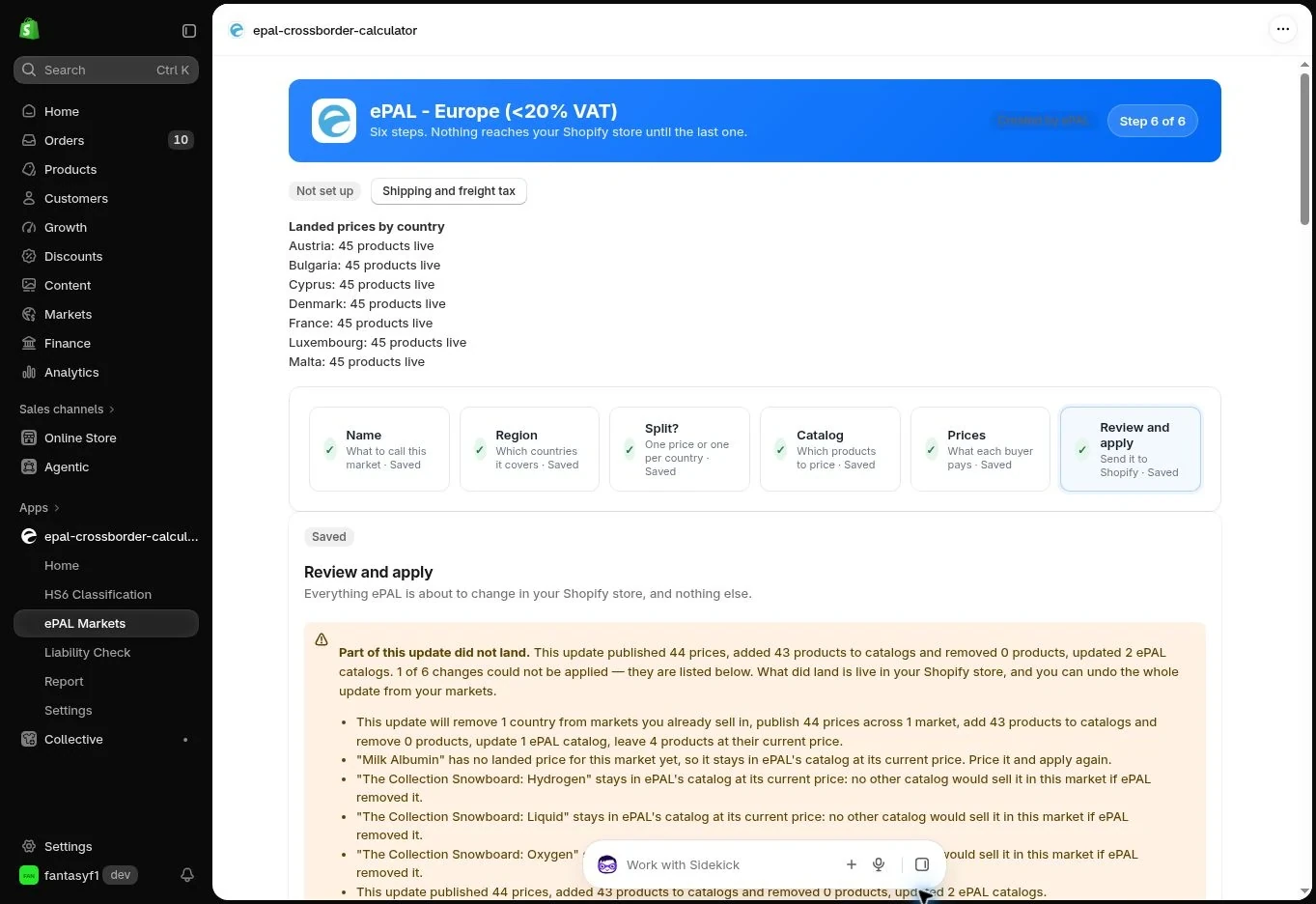
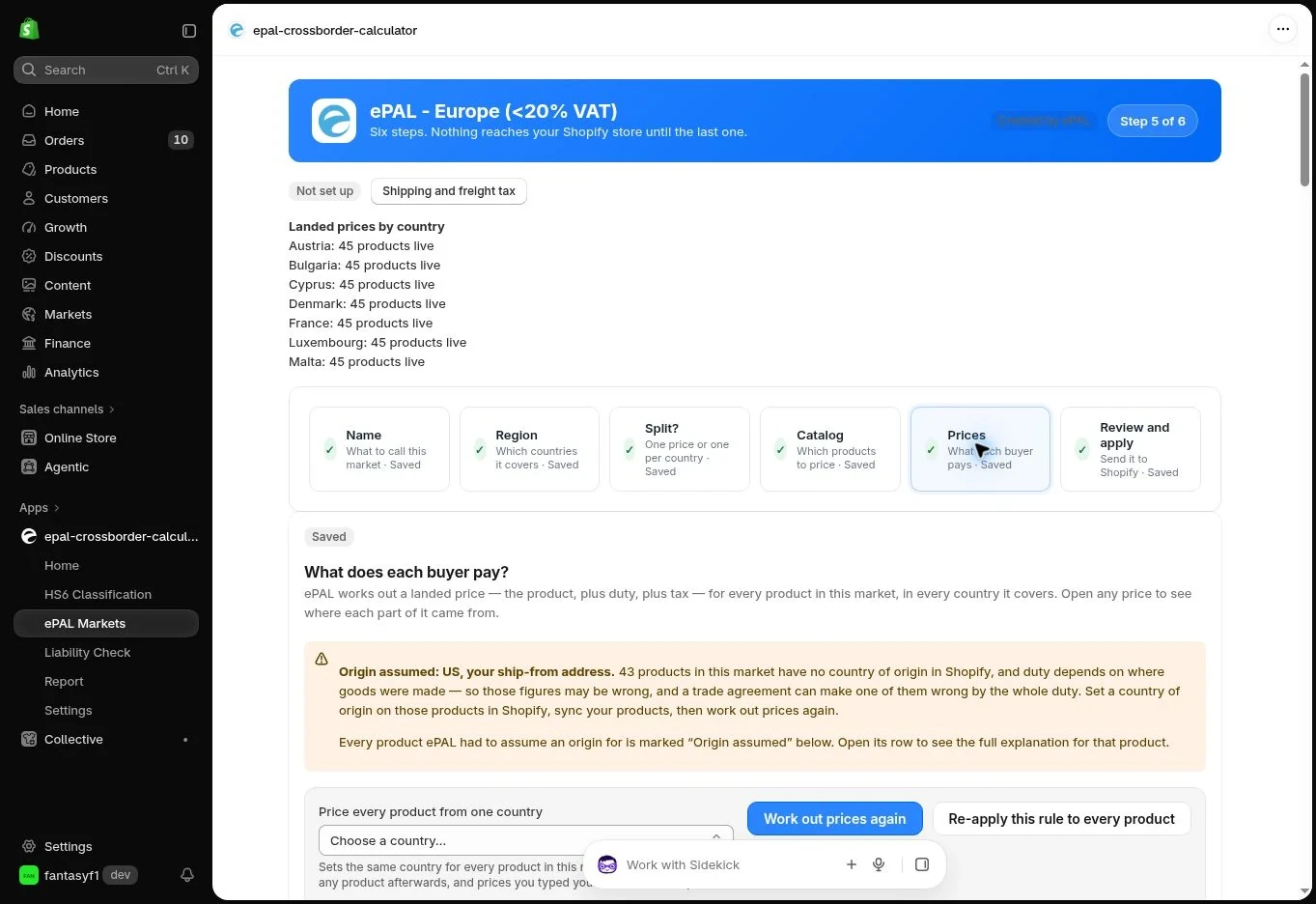
A useful feature of Cross Border Calculator is that a change to the source-country price of one or many products can be reflected across every country in which those products are covered, using a few clicks to recalculate and review the new proposed prices.
You can choose to update all relevant destinations together, use common regional prices or retain specific manual overrides. Changes to domestic included-tax rates, HS6 classification, customs origin or dispatch assumptions may also call for recalculation.
No per-repricing or republishing fee applies while subscribed. Recalculate whenever it makes sense, including regular weekly checks if your catalogue or duty and tax exposure is significant. ePAL may flag prices that appear stale and may announce relevant regulatory changes, but it never automatically republishes revised prices: you decide when and what to change.
4.7Remove products or destinations from ePAL#
If you no longer want ePAL-managed pricing for a product or destination, decide what Shopify price will replace it. The app's supported removal or restoration workflow is intended to help you avoid leaving a country with a misleading fallback price.
Check the destination storefront and checkout after withdrawing coverage. A product returned to standard Shopify pricing can still attract import duties and tax under the applicable delivery arrangement; removing it from Cross Border Calculator does not remove those liabilities.
CHAPTER 05Prices in the Storefront and Checkout
5.1What an international customer sees#
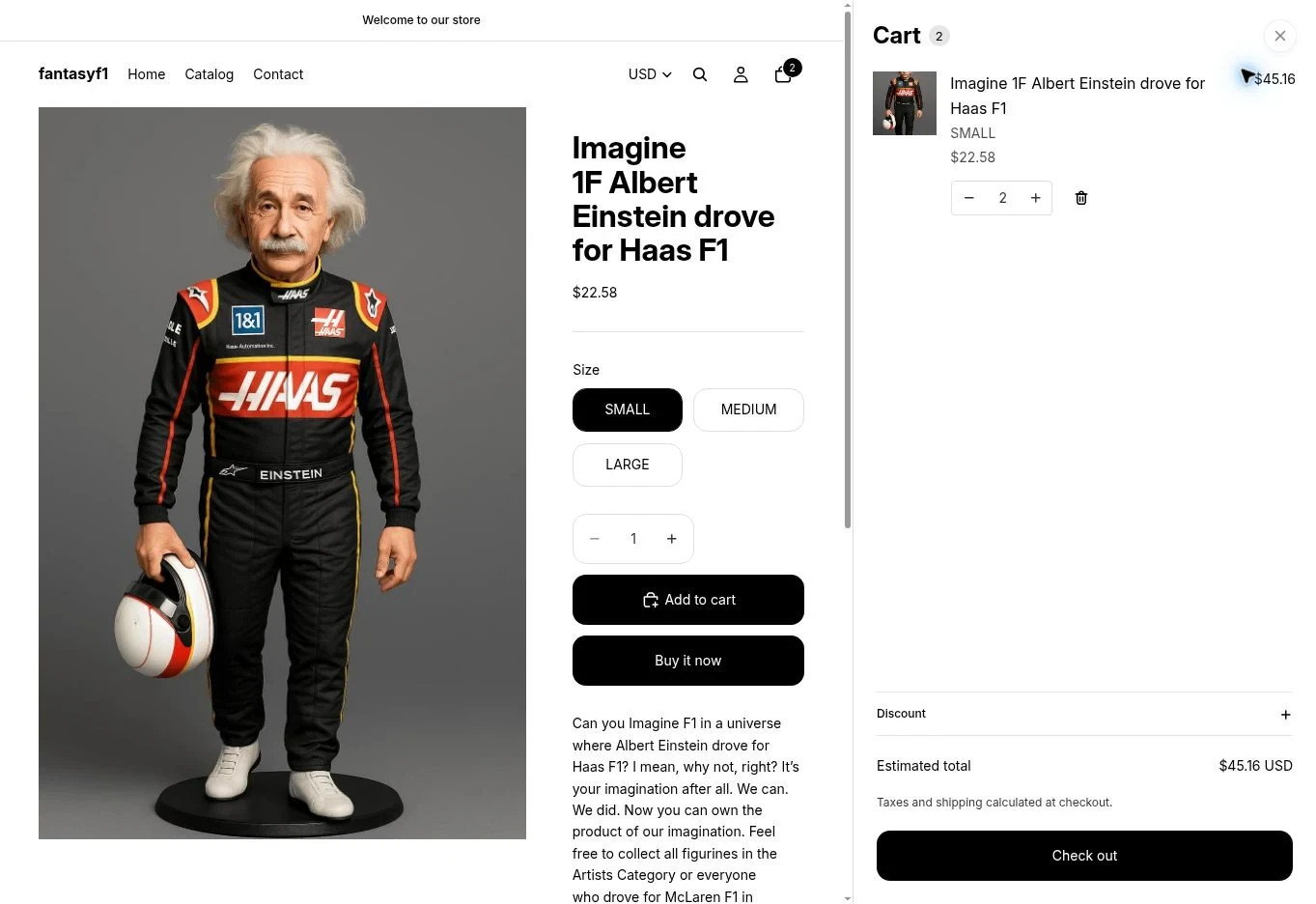
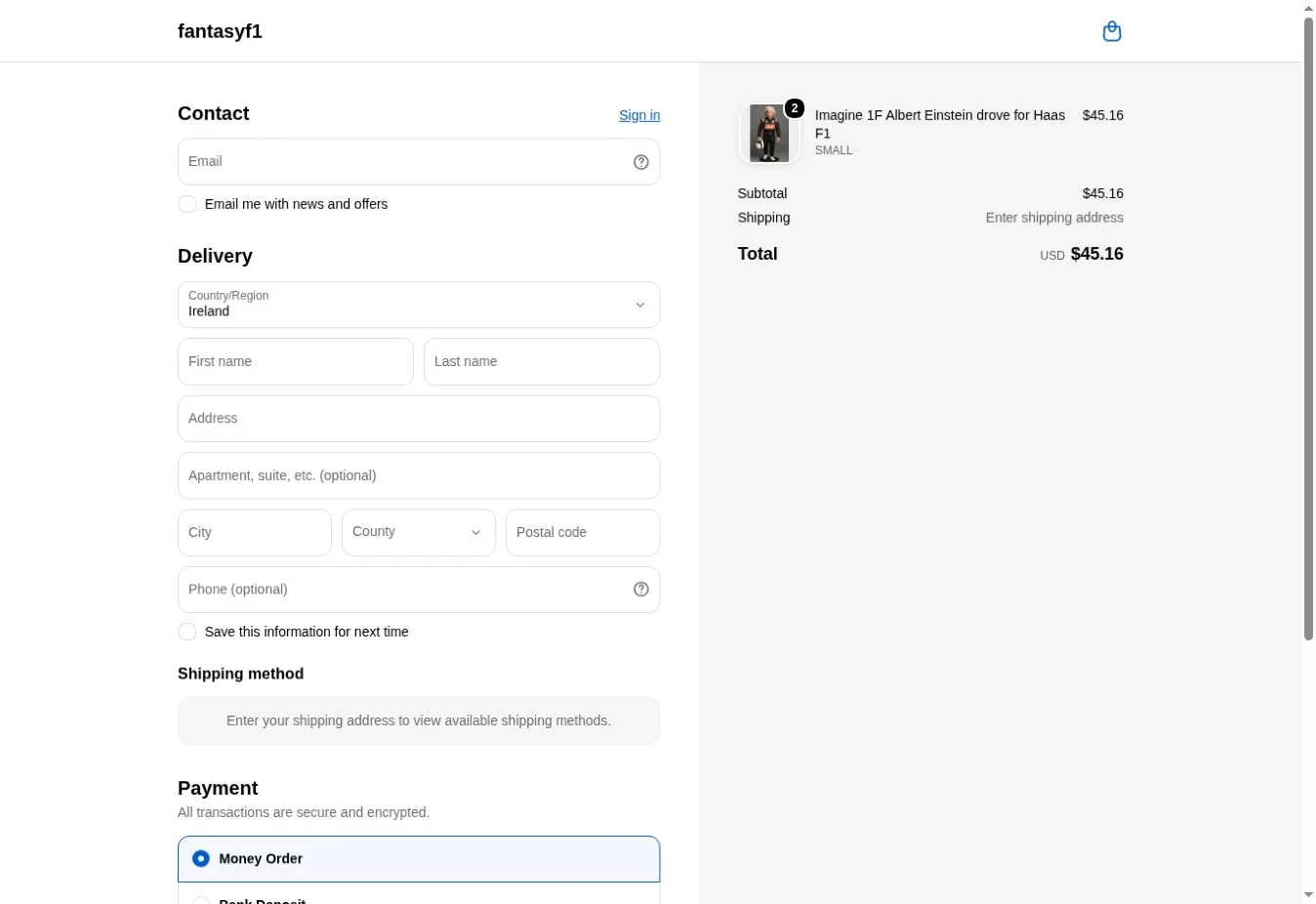
For products and destination countries covered by Cross Border Calculator, Shopify displays your chosen published price, including the product duty and tax allowances you accepted or adjusted. You may use a separate price for each destination, a common regional price or a manually selected commercial price.
ePAL calculates and displays the pricing components in the store currency. Shopify or your payment service provider performs the currency conversion shown to customers and the payment-processing work. The Shopify checkout remains the checkout; Cross Border Calculator does not intervene in your payment services.
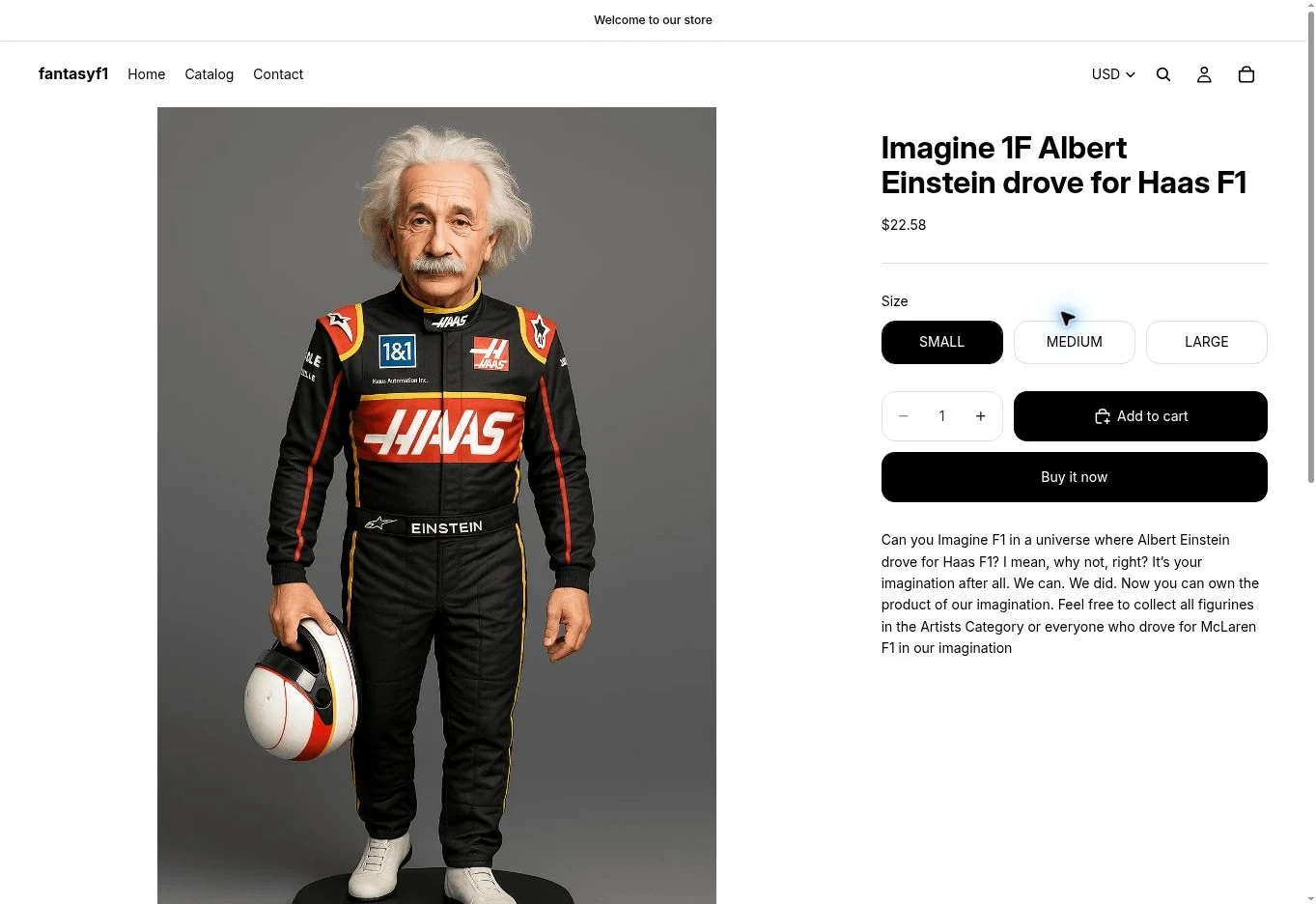
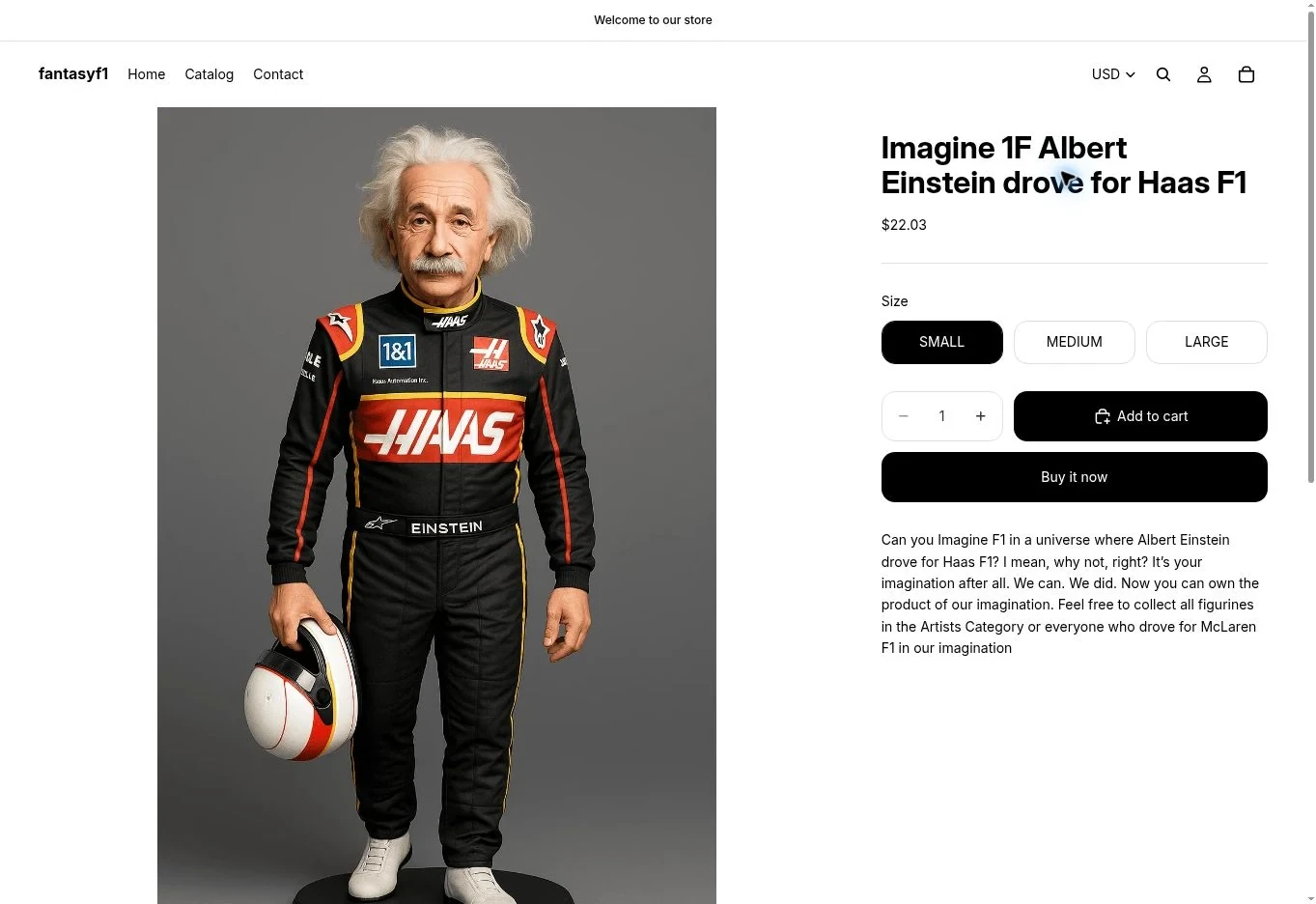
These demonstration captures use the same variant and quantity. The theme’s closed country selector displays the currency only. The selected destination was changed between captures; these prices are examples from the test store, not current tariff quotations or delivery-total guarantees.
5.2Product prices and additional delivery charges#
A precalculated ePAL product price takes account of the relevant product base price, customs duty and destination tax under the facts supplied. The merchant can choose to publish that suggested amount or a different commercial price.
Dynamic shipping, handling, brokerage and other fulfilment charges are separate. Because ePAL Basic calculates each product-country price before the basket is known, it cannot dynamically insert a basket-specific shipping amount into that product price. Shopify still manages shipping and other non-product charges.
You can nevertheless choose to advertise a fully landed or delivery-inclusive customer amount where your store's shipping, handling and other checkout charges adequately cover the costs you have undertaken to pay, and your chosen DDP or equivalent fulfilment arrangement ensures there are no surprise collections. You are responsible for setting the total charges, payment and carrier arrangements accordingly; ePAL's product calculation is a key input, not a guarantee that all later charges have been paid.
5.3Example: one product, two country prices#
The following comparison uses the same product, with a €100 tax-exclusive source price and a purely illustrative 8% import duty in each country. The different illustrative destination VAT rates lead to different suggested product prices. All figures are in the merchant's store currency, EUR.
- Source price
- €100.00
- Illustrative duty (8%)
- €8.00
- Illustrative VAT (23% of €108)
- €24.84
Illustrative suggested product price
- Source price
- €100.00
- Illustrative duty (8%)
- €8.00
- Illustrative VAT (19% of €108)
- €20.52
Illustrative suggested product price
This is not a live tariff quotation, and the 8% duty is hypothetical. Actual product classification, import valuation, origin, trade arrangements, shipping-tax treatment, currency and regulatory rules affect real calculations. If you prefer, you can publish the same selling price in both countries or override either calculated price. Shopify handles any subsequent customer-currency conversion.
A captured calculation example. The screenshots below show the same Einstein SMALL variant with a USD 15.00 starting price. The stored Austria result is USD 22.03 and the Denmark result is USD 22.95. These differ from the illustrative EUR example above and are shown to explain the interface, not to establish a current duty rate.
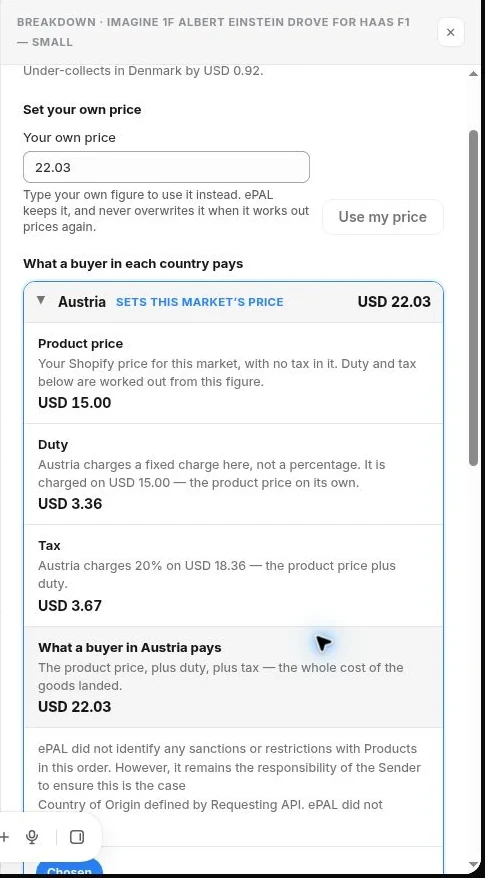
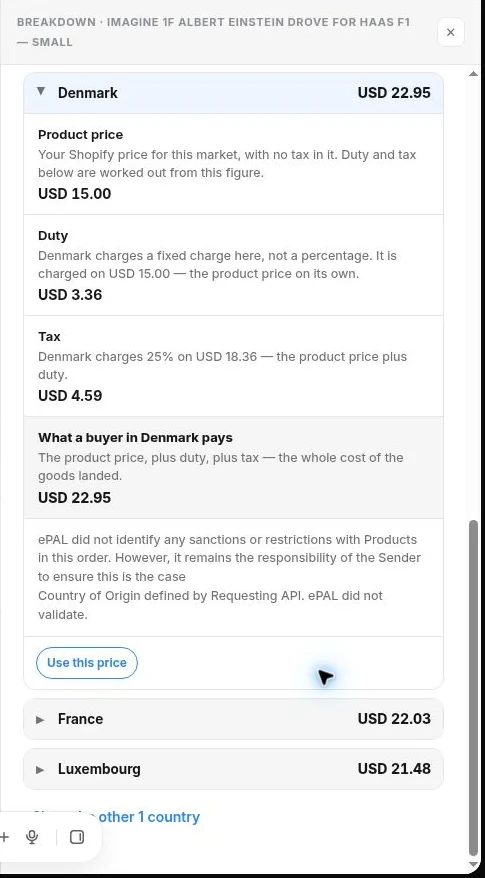
This regional market uses a common Austria-based selling price. The app warns that this would under-collect against the Denmark calculation by USD 0.92. A country’s calculated result and the common price chosen for publication are different things.
5.4Mixed baskets and uncovered products#
If a merchant offers ePAL-precalculated landed product prices to a country, ePAL strongly recommends including all products sold to that country in the same pricing approach, rather than leaving some products priced by Shopify without equivalent import tax and duty treatment.
Cross Border Calculator does not block a mixed basket, and a basket containing one proven ePAL-priced purchased line still counts once for subscription usage. However, combining covered and uncovered products can create a confusing landed-cost position: the uncovered lines may attract additional import tax, customs duty, carrier handling fees or customs intervention, even where the covered products were priced appropriately.
Customers may believe that an international checkout has already accounted for their entire order. Test mixed baskets carefully, and only promise that additional delivery charges are covered if your actual shipping, customs and collection arrangements support that promise.
5.5Country changes, variants, quantities and discounts#
A customer's delivery country, variant, selected quantity and discounts can change how Shopify displays or charges a product. The ePAL product-country amount is precalculated, so it does not incorporate discounts that are only known when the completed basket is assembled.
Native Shopify features will generally work through Shopify's own pricing and checkout paths, but not every theme, plugin, discount app or sales route is supported in every combination. Some quantity-tier, basket-value or basket-composition discounts cannot be anticipated when calculating the price of an individual product for a country. These should be tested before relying on them for cross-border pricing.
Shopify remains responsible for customer-currency FX and payments. For ePAL subscription billing, a qualifying completed sale still counts once where price-use evidence is proven, even if Shopify applies a discount or currency conversion.
5.6If checkout shows an unexpected amount#
When the price differs from the expected ePAL figure, first check the destination, variant, Shopify currency display and Market/Catalog price source. If the customer sees a lower ordinary Shopify price, investigate overlapping Markets. If the checkout amount is unexpectedly higher, check for product import tax or duty being added again by Shopify or another plugin.
Confirm that shipping and other non-product charges are being applied as planned. Do not adjust the domestic base price merely to compensate for an unexplained checkout total, because that change may affect every destination. Follow the step-by-step troubleshooting process.
CHAPTER 06Day-to-Day Operations and Order Management
6.1A typical operating routine#
Because ePAL Basic precalculates product-country prices, there is no need to recalculate at every customer visit. A useful routine is to review relevant alerts and product changes, inspect your published prices, and reprice regularly, for example once a week, where exposure to duty and tax changes makes that appropriate.
There is no additional charge for reclassification, recalculation or republication under an active subscription, and you remain in control of which recalculated prices are published. A stock change, new warehouse, source-price change, product description update or new destination Market is a sensible reason to review the affected prices.
6.2Understand product and pricing status#
A managed product or destination may be ready for review, published, blocked by a conflict, or suspended following a later change. These are descriptions of the intended operational states; the final app may use slightly different labels.
- Not configured / draft: You have not yet completed the information or decision needed for ePAL pricing.
- Calculated / ready for review: A calculation exists but has not been accepted and published.
- Active: The reviewed ePAL price has been published and verified for the intended coverage.
- Conflict / action required: Another setting or price source may prevent the intended price being used.
- Suspended: Coverage needs attention and should not be treated as a reliable active ePAL price until revalidated.
Do not treat a successful calculation message as confirmation that the effective Shopify checkout price is correct. Publication and verification matter separately.
6.3Respond to changes and alerts#
Cross Border Calculator may alert you to changed inputs, possible outdated prices, new Market/Catalog conflicts and relevant changes in duty or tax treatment. ePAL may also publish notices about regulatory developments.
These alerts help you prioritise attention, but do not replace the merchant's obligation to monitor rules that affect their imports. Recalculate relevant products as frequently as your business needs, review differences and approve new publication if appropriate. Nothing is repriced automatically.
6.4Analyse transactions in the ePAL Portal#
Shopify continues to provide your primary order administration. Use the separate ePAL Portal for transaction analysis, including reviewing ePAL-powered activity and the transaction information available to your account.
Liability Check and Report are inside Cross Border Calculator in Shopify Admin. Open those app navigation items for Shopify order duty/tax checks and reporting. They are not screens in the ePAL Portal.
When investigating a transaction, compare the Shopify store and order reference, purchased lines and quantities, currencies and available calculation information. Use the Shopify Liability Check for duty/tax comparisons and the Shopify Report screen for the app’s reporting views.
6.5Use Liability Check in Shopify#
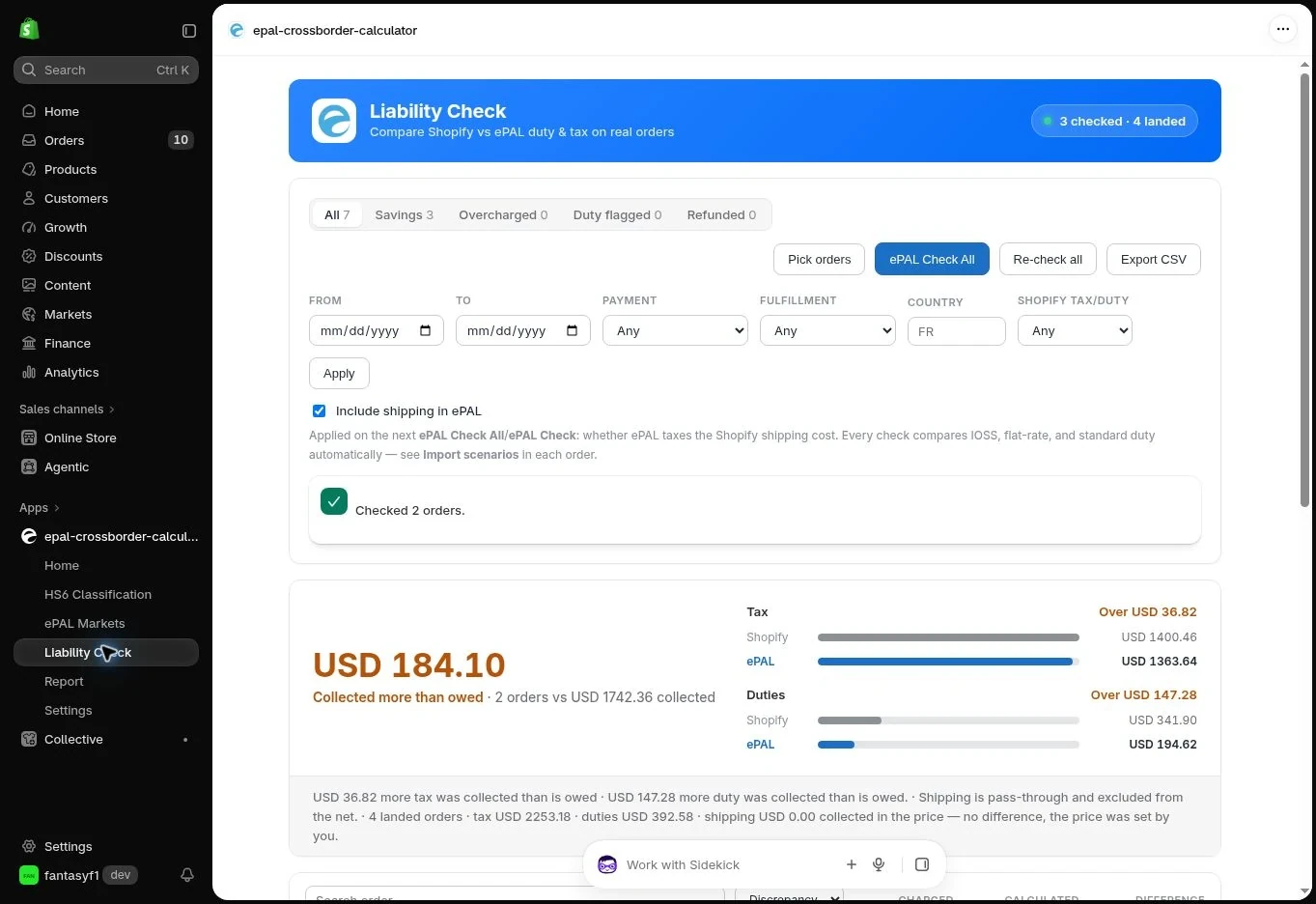
In Shopify Admin, open Cross Border Calculator → Liability Check. This screen compares Shopify-collected duty and tax with ePAL calculations and provides available order-level breakdowns. Use its date, payment, fulfilment and country filters to narrow the view.
For products sold at an ePAL-published landed price, duty and tax may already be included in the item price. Read the order’s collection basis before treating a displayed component as an additional amount owed.
Liability Check can help when reviewing an order, preparing a shipment or investigating a return. Any amount shown is a calculation or comparison, not proof that a customs authority has accepted a declaration or that a carrier has paid a charge. The ePAL Portal remains the separate transaction-analysis environment.
6.6The portal and fulfilment-stage information#
The Shopify plugin's Basic version does not provide an order-revalidation action before fulfilment. The initial published price is a product-country calculation, not an on-demand basket-specific clearance calculation.
Use the ePAL Portal for transaction analysis, and use Liability Check and Report inside the Shopify app to inspect the available Shopify duty/tax comparisons and reports. If goods, prices or customs assumptions change after sale, coordinate the required action with your carrier or customs representative; do not assume the original Shopify checkout or order will be amended automatically.
Viewing or analysing an already-counted order does not turn it into another billable Shopify basket.
6.7Use Shopify reports and review order history#
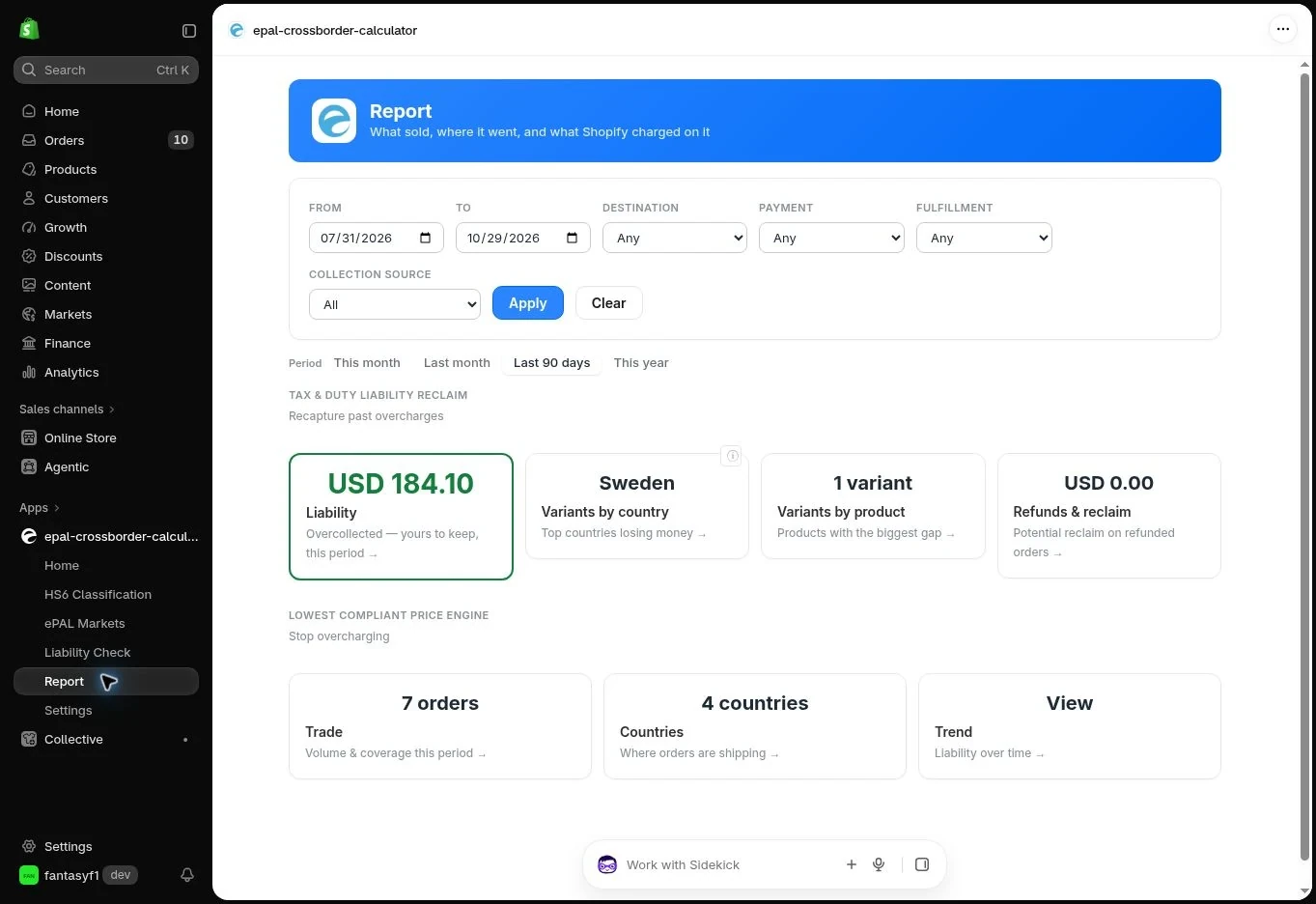
In Shopify Admin, open Cross Border Calculator → Report. Choose a date range and, where useful, filter by destination, payment, fulfilment or collection source. The screen provides entry points for liability, trade, countries, trends, product/variant comparisons and refunds/reclaim information.
These are Shopify app reports. Use the separate ePAL Portal for transaction analysis. A sales or liability report is not automatically the same as the qualifying-basket count used for subscription billing; see subscription and order-level usage.
If an expected order does not appear immediately, allow for order discovery and evidence checks. An unresolved order is not counted as qualifying while price use remains unproven. If a discrepancy persists, compare the Shopify order ID and store with the relevant ePAL transaction information and use the support guidance.
CHAPTER 07Pricing, Usage and Billing
7.1Your ePAL Basic subscription#
ePAL Basic costs USD $79 per Shopify store per monthly billing period, including the first 100 qualifying completed cross-border baskets that used an ePAL-published price. From the 101st qualifying basket in that period, the charge is USD $1 per additional basket. Shopify manages the app's subscription and usage billing.
While the monthly subscription remains active, there is no additional ePAL fee for product classification or reclassification, calculating or recalculating destination prices, adjusting a proposed price, publishing prices, visiting a product page, or a basket that is abandoned before a qualifying sale. The Basic plan is not charged as a percentage of the basket value.
Each store has its own subscription and included 100-basket allowance; applicable taxes that Shopify may add to app billing are separate.
7.2What counts as a qualifying basket?#
For this subscription, one qualifying basket is one eligible production Shopify order that:
- Belongs to your subscribed Shopify store and falls within the applicable coverage period after the store was first successfully configured for ePAL.
- Represents a completed cross-border sale under ePAL's order-eligibility rules.
- Contains at least one purchased product line for which ePAL can demonstrate that Shopify actually used the ePAL-calculated and published price.
For a basket to count, the evidence needs to be linked to a purchased order line. Simply having the product in an ePAL Market, matching its displayed amount to an ePAL price or assuming an order used ePAL is not enough. If evidence is missing or inconclusive, the case remains unresolved and will not be charged as a qualifying basket unless the evidence is subsequently established.
Important terminology: ePAL uses “confirmed sale” in its commercial explanation to mean a sale that has occurred and meets the above conditions. It is not dependent on Shopify's technical Order.confirmed status, payment capture, shipment, fulfilment or delivery.
7.3One order counts once#
One qualifying Shopify order counts once toward that store's billing period, even where it contains multiple ePAL-priced product lines or several units of the same product. The evidence relates to the actual purchased Shopify order line, not just the fact that a product appears in an ePAL-managed catalogue.
A later order scan, portal review, Liability Check or fulfilment activity does not create a second qualifying sale. A completed eligible sale remains in the count even if shipping or payment completion occurs later.
7.4What does not generate a usage charge?#
The following activities do not themselves generate qualifying-basket usage charges:
- Classifying or reclassifying products, including using the richer HS6 lookup in the ePAL portal.
- Calculating, recalculating or republishing prices for any number of supported product-country combinations.
- Customers looking at products or adding products to baskets without completing an eligible purchase.
- Abandoned or dropped baskets and checkouts.
- Domestic orders outside the eligible cross-border criteria, or orders containing only ordinary Shopify-priced products.
- Orders where evidence that the purchased line actually used an ePAL price remains unresolved.
- Reviewing an existing Shopify order in the portal or running the Liability Check.
A particular purchase route is counted only where ePAL has sufficient evidence to prove that the price was used on a purchased line.
7.5Examples of monthly charges#
| Qualifying baskets in one billing period | Monthly subscription | Additional basket charges | Total before applicable taxes |
|---|---|---|---|
| 0 | $79 | $0 | $79 |
| 99 | $79 | $0 | $79 |
| 100 | $79 | $0 | $79 |
| 101 | $79 | $1 | $80 |
| 102 | $79 | $2 | $81 |
| 150 | $79 | $50 | $129 |
The first 100 qualifying baskets do not incur $1 overage charges, and crossing the threshold does not create retrospective charges for those included baskets. The allowance renews with the Shopify subscription billing period, not necessarily at the beginning of a calendar month.
7.6Multiple stores and other ePAL integrations#
Each subscribed Shopify store has its own $79 monthly subscription, its own 100-basket allowance and its own billing period, even if several stores are linked to the same ePAL account.
WooCommerce transactions and direct API usage do not consume a Shopify store's included basket allowance. Billing associated with other ePAL offerings is handled separately under the terms applicable to those offerings.
7.7Cancellations, returns and duty/tax reclaim evidence#
A completed eligible order stays in the original usage count when it is later cancelled or refunded. There is no automatic usage refund merely because the merchant refunds the customer. An incorrectly counted order can still be investigated and corrected based on its pricing evidence.
The calculation data remains useful after a return. Product-level duty and tax breakdowns can help a merchant prepare evidence of possible eligibility for a customs-duty or import-tax reclaim, including where only some products in the order are returned. A reclaim is subject to the relevant customs and tax rules, evidence and procedures, and is never guaranteed merely because ePAL retained a breakdown.
Keep the return records and any customs or carrier evidence needed to substantiate a refund or reclaim claim.
7.8Review subscription and order-level usage#
Use Shopify’s app billing information to review the store’s approved subscription and billing records. For usage reconciliation, compare the billing period, qualifying basket count, included allowance and overage charges with the underlying order and price-use evidence available for the store. Contact ePAL support if the available records do not explain a counted order or charge.
The Report and Liability Check screens inside Cross Border Calculator provide Shopify sales and duty/tax information. The ePAL Portal is used for transaction analysis. Do not assume that the number of rows in a sales, liability or transaction view is the number of qualifying billable baskets.
Where several Shopify stores are linked to the same ePAL account, the Portal provides a combined account-level view suitable for cross-store transaction review and analysis, while the subscription and included basket count remain separate for each Shopify store. If a business prefers not to see every store's ePAL transactions under one profile, separate ePAL accounts can be used. See data access and confidentiality.
7.9Dispute an incorrect usage charge#
If a basket appears to have been counted incorrectly, check the reporting period, store identity, Shopify order number, qualifying product lines and the recorded ePAL price-use evidence. Check whether you are viewing the same order more than once under different reporting filters, rather than assuming two displayed records mean two charges.
If the evidence does not support the charge, contact ePAL support with the shop domain, order identifier, billing period, disputed amount and a short explanation. ePAL should investigate the linked order and billing records. Do not send customer payment-card data or administrator credentials.
If the amount is reflected on Shopify's app billing statement, compare the statement with the ePAL usage report and include the relevant Shopify billing reference in your query.
7.10Plan approval, development stores and cancellation#
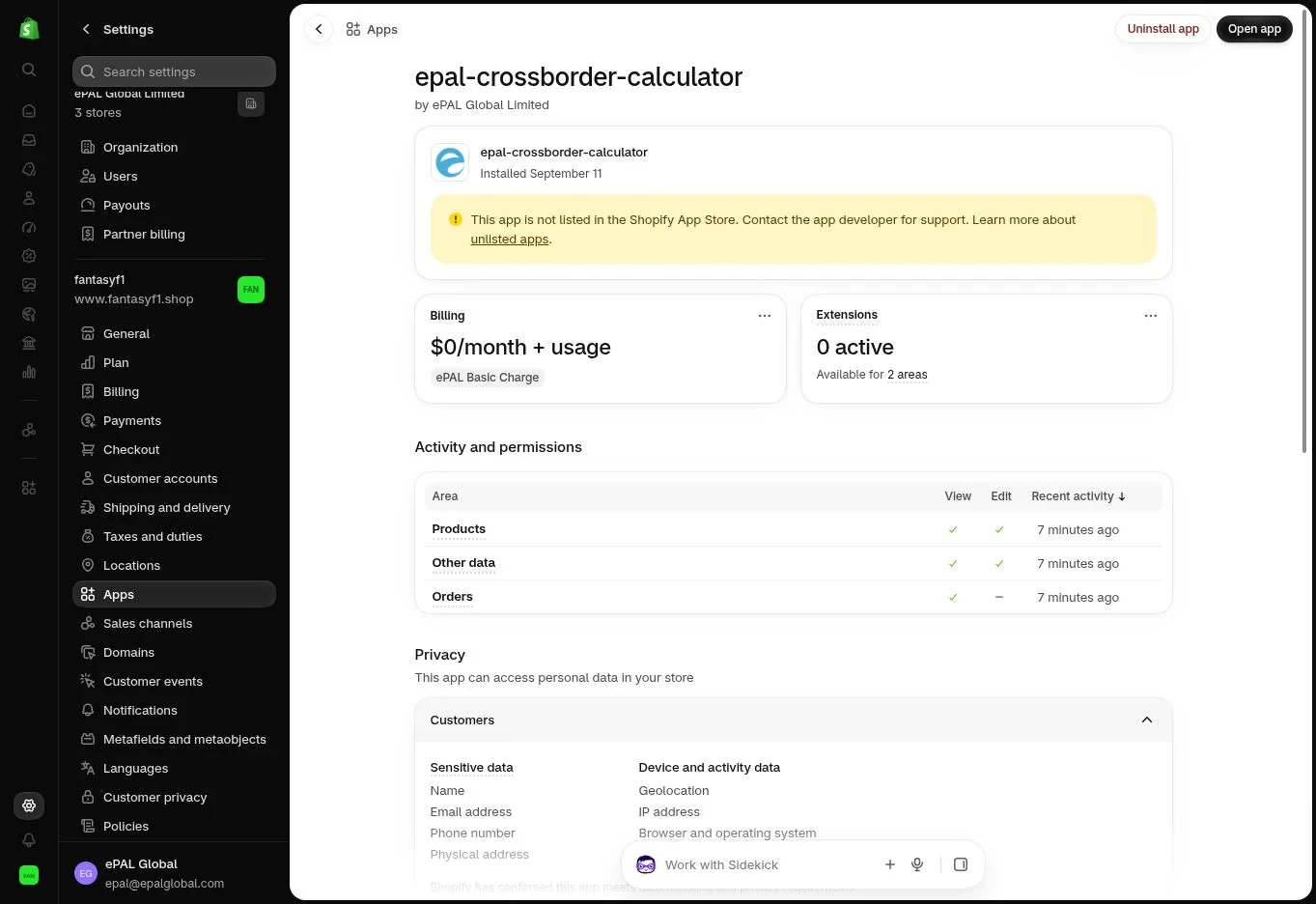
Production use requires the applicable Shopify subscription to be approved and active. Development or partner-store testing access may be free under the app's configured testing arrangements; this is not an introductory free trial or a discount that automatically applies to production stores.
Cancelling the subscription or uninstalling the app can affect continued access to ePAL product pricing, reporting and the Liability Check. Before ending the service, follow the removal process in Section 10 and ensure that appropriate replacement prices are in place. Shopify's treatment of app-billing dates and any outstanding charges is governed by the applicable billing arrangement.
CHAPTER 08Troubleshooting and Self-Service Support
8.1A sensible first check#
Most problems can be narrowed to a disconnected store or subscription, incomplete product facts, competing Shopify Markets/Catalogs or checkout tax/duty/shipping settings. Some are associated with unsupported discount or purchase-route combinations.
Before changing anything, make a note of the Shopify store, product and variant, country, source and customer-facing currencies, purchase route and the amount you expected versus the amount actually shown. Use the ordered troubleshooting steps to isolate the problem.
8.2Common problems#
| Symptom | Checks and recommended action |
|---|---|
| ePAL opens but the store is not connected | Check that installation completed for the intended Shopify store, the ePAL account is linked and you have the necessary permissions. Reopen the app and inspect the connection state. |
| The app says there is no active subscription | Check Shopify's app approval and billing state for this store. An abandoned approval is not an active subscription. Do not repeatedly approve new subscriptions until the existing state is clear. |
| A product cannot be calculated | Check required product description, classification, origin, dispatch country, source price and tax-inclusive settings. Resolve any missing or contradictory information. |
| The customs classification looks wrong | Review the product's material, function and other distinguishing facts, compare available evidence and correct or request review of the classification. Do not override it merely to obtain a lower duty rate. |
| A product shows its base price instead of the ePAL price | Check that the product/variant and country are active, the latest calculation was published, and Shopify has no applicable competing price authority. Test the exact destination and buyer context. |
| Two Markets affect the same product | Review the specific Market and Catalog warning. Select ePAL price ownership, existing Shopify pricing or defer activation. Do not assume every duplicate publication is itself a conflict. |
| A previously correct price changes | Inspect recent Shopify Market, Catalog, price-list, product, currency and ePAL publication changes. Re-run verification and resolve any new conflict before republishing. |
| Tax or duty appears to be charged twice | Check whether the published product price already includes the amount and whether Shopify or another service is collecting it again. Review the affected destination's tax and duty configuration. |
| Shipping or a delivery fee is missing | Check Shopify shipping rates and fulfilment arrangements. ePAL Basic does not calculate or arrange shipping. |
| A customer sees a different price after changing country | Check whether both destinations are supported and configured, the relevant prices are published, and currency and Market settings differ. |
| The Liability Check differs from an order total | Review whether tax and duty are embedded in an ePAL product price, plus shipping, discounts and currency effects. A breakdown is not necessarily an additional amount owed. |
| An expected order is missing from ePAL usage | Confirm that it is a completed production cross-border order, was created after the first successful ePAL setup and contains proven ePAL price use. Allow for delayed discovery and check again. |
| An order was counted despite a refund | A correctly qualifying basket remains counted following a later cancellation or refund. Review the underlying evidence if you dispute qualification. |
| An order seems to have been charged twice | Compare the Shopify shop, order ID and billing period, and inspect individual usage charges rather than report rows alone. Escalate suspected duplicate billing with the relevant references. |
| An accelerated checkout or third-party route behaves differently | Reproduce the route and check whether it is one of the purchase routes verified to preserve the required price-use evidence. Report the route and checkout conditions to support. |
8.3Step-by-step troubleshooting#
For an unexpected product or checkout price, work through the following steps in order:
- Confirm the destination and product variant. Different countries or variants can correctly produce different prices.
- Check the source price and included domestic tax. A tax-inclusive source price treated as tax-exclusive can materially distort every destination calculation.
- Review the HS6 starting code and product facts. Use the portal's enhanced classification assistance if necessary.
- Inspect the proposed ePAL amount and any manual override. Check whether a regional price or country-specific price was selected.
- Confirm that you published the intended version. Saving or calculating a draft does not change the Shopify storefront.
- Review Markets and Catalogs. A competing independent price source can cause Shopify to display a lower or different price.
- Test product page, basket and checkout. Check whether Shopify or another app adds product import duty or tax already included in the published price.
- Check shipping and discounts. Dynamic delivery charges or basket-based discount plugins can change checkout totals independently of the precalculated product price.
For a billing discrepancy, check the Shopify store, subscription period, relevant order IDs, qualifying purchased lines and retained price-use evidence before contacting support. One basket can count only once, even with multiple items.
8.4Information to provide when contacting support#
To help ePAL investigate efficiently, include the Shopify store domain, relevant Shopify order number (if any), product and variant, destination country, date and approximate time, currency, expected result and actual result. Screenshots of the relevant calculation, warning or billing report can also help.
For a Market conflict, identify the affected Markets and Catalogs shown by the app. For a subscription issue, include the Shopify billing period and statement reference where available. For a checkout issue, say whether it happened through the standard basket, cart drawer, accelerated checkout or another route.
Do not send passwords, access tokens, full payment-card details or unnecessary customer personal information. Support can request additional evidence through an approved secure channel when necessary.
8.5When not to change settings yourself#
If a warning concerns a potentially restricted item, sanctions, licensing or an uncertain HS6 classification, do not change product facts simply to silence the alert. Seek appropriate specialist advice where needed, and give ePAL any official customs material that helps explain a dispute.
Similarly, investigate the impact of proposed Market/Catalog changes on other destinations and customers before approving them. A shared Shopify Catalog may affect more than one country.
CHAPTER 09Compliance, Security and Merchant Responsibilities
9.1What ePAL's calculations mean#
ePAL calculates proposed product tax and duty allowances using the facts you provide and the applicable calculation logic. Its suggestions and tools are helpful for pricing, but neither ePAL nor Cross Border Calculator is a customs authority or regulatory adviser. The act of including duty and tax in a product price does not submit a declaration or remit those amounts.
Customs authorities may dispute a tariff code, value, origin or other calculation basis and may assess a different liability. For circumstances beyond ePAL's control, including inaccurate source facts and a Customs disagreement with a suggested classification or calculation, ePAL does not accept responsibility for resulting differences, subject to the applicable agreement and law.
9.2Accurate HS6 classification, origin and product facts#
The quality of the calculation depends on the source information. Merchants are responsible for descriptions, materials and composition, commercial value, applicable domestic tax, customs origin, likely dispatch location and any selected HS6 code or override.
A six-digit HS6 code is only a starting point. ePAL then determines the relevant longer country-specific tariff detail for destination rates. Even where the inputs were prepared carefully, Customs may disagree with the classification, origin, value or other treatment and determine a different amount.
If Customs does dispute a shipment, send ePAL the official material you receive, such as a ruling, decision, demand, notice or amended declaration. ePAL can review the material and, where appropriate, incorporate relevant learning into its classifications and calculations to reduce recurrence. This does not substitute for pursuing any appeal, correction or payment obligations within the applicable deadlines.
9.3Import restrictions and eligibility#
An import restriction, sanctions requirement or licence condition can apply even where a product has a valid classification and duty rate. Cross Border Calculator does not consistently alert on every possible import restriction or eligibility condition. An absence of an alert is not confirmation that the shipment is allowed.
If the app does show a restriction or handling warning, take it seriously. Check the relevant rules and fulfilment requirements rather than proceeding on the assumption that tax/duty calculation is sufficient. ePAL does not accept liability for consequences of sending goods contrary to an applicable warning or required shipping condition, subject to the applicable agreement and law.
A product being available through a Shopify Market is not evidence that it can be imported legally into the destination.
9.4Tax collection and fulfilment responsibilities#
Arrange who will act as importer, who pays and accounts for import taxes and duties and how goods will be cleared. Your sales terms, Shopify checkout, carrier or customs broker and any relevant IOSS arrangements need to be consistent.
If you choose to include all anticipated shipping, handling and import-related costs in your product and other checkout charges, you may be able to advertise a fully landed customer price. That is a merchant commercial and fulfilment decision: ePAL Basic does not automatically set dynamic shipping rates or tell a carrier to deliver DDP. A customer's import payment obligations under DAP or another arrangement are not removed merely because an ePAL price has been calculated.
9.5Merchant overrides and auditability#
You may choose to publish a selling price above or below ePAL's suggested product-country landed cost, or set a common price across multiple countries. Record significant overrides and their rationale, particularly if the published amount is lower than the calculated exposure.
Maintain documentation supporting classifications, tax assumptions, Customs decisions and refunds/reclaims. The order price-use evidence retained for subscription billing explains why a Shopify sale counted; it is not by itself a substitute for customs declarations or proof that charges were paid.
9.6Data access, shared accounts and confidentiality#
Each Shopify store has its own ePAL Basic subscription and included-basket allowance, even when several stores are administered under one ePAL account.
One shared ePAL profile offers a consolidated portal view. If a merchant deliberately connects several Shopify stores using the same ePAL account credentials, authorised people with access to that ePAL profile can see ePAL-powered transactions from those stores together and use the portal for combined analysis and insights. This is often convenient for multi-store merchants.
Separate ePAL profiles keep store activity separate. If store owners do not want all ePAL-powered orders visible within one shared portal account, they can configure a different ePAL profile for each Shopify store. There is no extra ePAL account fee for choosing separate profiles in this Shopify model; each store needs its own USD $79 subscription in either arrangement, and the portal's included tools do not attract additional fees under that subscription.
Manage staff access appropriately and review ePAL's privacy information and Shopify's app permissions for the applicable policies on personal data, retention and access.
9.7Regulatory changes, stale prices and repricing#
Duty and import-tax rates, rules and customs practices can change after a product price has been published. ePAL may publish relevant announcements and may identify stale calculations, but ePAL is not a regulatory adviser, and merchants remain responsible for identifying changes that affect their business and choosing when to update prices.
The practical response is straightforward: recalculate your existing product-country prices regularly, for example weekly, review the differences and publish the changes you want. Cross Border Calculator is designed for rapid repricing, and there is no separate fee for repeat calculations or publishing revised prices while your subscription remains active.
ePAL never automatically changes published prices in response to a rule change or age warning; the merchant controls what customers are charged.
CHAPTER 10Account Administration and Uninstalling
10.1Manage your connected store and account#
Verify the Shopify store identity before changing its product settings or subscription. Each store has its own subscription, regardless of whether it shares an ePAL portal account with other stores.
Only authorised staff should change tax assumptions, classifications, manual pricing or Markets and approve Shopify billing. For multi-store reporting, you can keep one ePAL profile for consolidated visibility or separate profiles for data separation; see Section 9.6.
10.2Temporarily stop using ePAL pricing#
If you want to stop using ePAL-published prices for some or all products, first choose the replacement selling prices. A product that returns to ordinary Shopify pricing may no longer include a provision for customs duty and import tax, although those liabilities will still arise.
Review the Shopify Market/Catalog price paths, withdraw the relevant ePAL coverage through the supported flow and test representative country storefronts and checkouts. Suspending new calculations does not necessarily remove prices that were already published.
10.3Change products, destinations or account arrangements#
You can change the products, countries or regional price arrangements covered by Cross Border Calculator through the supported pricing and coverage workflow. Check the resulting storefront prices whenever you remove a country or switch a product back to ordinary Shopify pricing.
Changing the ePAL account associated with an existing Shopify app installation is not a supported reconnection workflow. If you need a different account arrangement, terminate the existing store subscription and start a separate new store subscription and configuration. Treat the two subscriptions as unrelated; do not expect the historical usage or billing records to transfer automatically.
10.4Cancel the Shopify subscription#
Before cancelling the ePAL Basic subscription, review your active ePAL-published product and country prices and decide which ordinary Shopify prices will replace them. Save the Shopify usage and ePAL portal records you need for business, accounting and dispute purposes.
Follow the app's supported subscription-cancellation procedure and confirm its status in Shopify billing. Ending the subscription does not automatically reverse properly incurred usage charges or guarantee that every live Shopify Market price has safely reverted to its previous amount. Test before you leave customers exposed to an unexpected fallback price.
10.5Uninstall ePAL safely#
Treat uninstallation as a pricing transition, not merely removal of an app icon:
- Review which product-country prices are currently published through Cross Border Calculator.
- Choose suitable replacement Shopify product prices and Market/Catalog configurations.
- Restore or replace the prices using the supported app workflow and test representative destination checkouts.
- Confirm Shopify will not duplicate product tax or duty and that any DDP/DAP commitments remain supported.
- Save the billing and ePAL portal records needed for refunds, customs reclaims and disputes.
- Cancel the subscription and remove the app through the supported Shopify workflow; verify the resulting status.
Uninstalling does not automatically refund previously qualifying orders, resolve existing Customs duties or guarantee that every Market change is reversed without review.
10.6Data retention and post-termination requests#
Some information may need to be retained for legitimate accounting, audit, investigation or legal reasons. The applicable privacy documentation governs how records are handled and what requests you may make. If you need access to historical calculation or billing information after termination, contact ePAL support and identify the Shopify store and relevant dates.
CHAPTER 11Frequently Asked Questions and Reference Material
11.1Frequently asked questions#
Do I need Shopify Plus?
No. ePAL Basic uses native Shopify Markets and Catalog pricing, so the basic version is designed for merchants across Shopify's store tiers. It precalculates product-country prices instead of requiring live checkout modifications.
Can I import existing products and Markets?
Yes. Cross Border Calculator can use existing Shopify product descriptions, Markets and Catalog information during setup. You do not have to recreate everything from scratch.
Does the setup have to be completed in one session?
No. Your progress is saved. Your live product/Market prices are not changed until you choose the final publication action.
Is the proposed ePAL price compulsory?
No. You can publish the suggested amount, charge more or less, and use common international, regional or individual country prices. The merchant remains responsible for any difference between the selling amount and actual import liabilities.
Can I reprice my products regularly without paying more?
Yes. Classification, reclassification, calculations and republication have no separate ePAL fee while your subscription is active.
What is an HS6 classification?
It is a generic six-digit starting code for customs classification. ePAL uses it with product details to derive the country-specific longer tariff code needed to calculate destination charges. The ePAL portal offers a more detailed HS6 lookup without changing your Shopify listing.
Can my domestic tax be removed from a base price?
Yes, where the supplied price includes a properly identified domestic tax amount and the applicable treatment permits it. Supplying an accurate included-tax rate can significantly affect the destination price.
Can a product ship from multiple countries?
Yes, but a precalculated price needs a dispatch assumption. Use a likely default, sell without ePAL-precalculated coverage for that route, or take a prudent highest-reasonable-cost pricing approach. None guarantees that Customs will agree with every eventual shipment.
Will ePAL change my Shopify checkout or payment provider?
No. Shopify manages checkout and customer-facing FX/payment processing. ePAL displays calculations in the store currency.
Does the Basic version calculate dynamic shipping charges?
No. Dynamic basket-specific shipping is not part of ePAL Basic. Configure delivery and any other non-product charges in Shopify.
Can I still advertise a fully landed price?
Potentially, if your product and non-product checkout charges cover the expected shipping, handling, clearance, tax and duty exposure and your delivery terms make sure the customer does not face unexpected collection.
Does the Basic version check IOSS eligibility for a basket?
No. It does not perform basket-level IOSS assessment. The merchant remains responsible for the applicable registration, thresholds and rules.
Can I mix covered and uncovered products in one basket?
The app does not prohibit it, but it is discouraged where a country is meant to have landed pricing. Uncovered products can trigger separate import tax/duty or handling charges and undermine the customer's expectation.
What if the same product appears in more than one Market for a country?
The app checks price-source conflicts. ePAL strongly recommends avoiding independent, competing prices for the same product and country because Shopify can present the lower eligible price rather than the intended landed price.
What if I choose the ordinary Shopify price instead?
Any product import tax and duty calculated by ePAL will not be built into that ordinary price unless you separately arrange for it. Those liabilities still arise and are paid according to your DDP, DAP or other delivery arrangement.
Do all themes and plugins work?
The app uses native Shopify capabilities and works with supported themes, but some purchase routes and discount plugins, especially quantity- and basket-value-based discounts, are not supported in every combination. Test your configuration.
Is there a Shopify-plugin order revalidation step?
No. The Basic plugin does not offer fulfilment-stage revalidation. Shopify orders and additional ePAL information are available in the ePAL portal.
How much is the subscription?
USD $79 per Shopify store per month, including 100 qualifying ePAL-priced baskets, then USD $1 for each additional qualifying basket. Shopify manages the billing.
Am I charged for products, classifications or dropped baskets?
No. There is no extra fee for classification, repricing or price publication, and an abandoned basket does not qualify as a sale.
Is each purchased item charged separately?
No. An eligible cross-border completed order counts as one basket, regardless of how many covered items it contains.
If an order is cancelled or partly refunded, can I reclaim import charges?
The ePAL breakdown may help support a customs-duty or tax reclaim, including part-order returns, but eligibility and evidence requirements depend on the relevant rules. A correctly counted ePAL subscription usage event is not automatically reversed by a customer refund.
Can multiple Shopify stores share an ePAL account?
Yes. That permits a combined ePAL portal view and analysis; each store still has its own Shopify subscription. For separate transaction visibility, use separate ePAL accounts at no additional account fee.
Can ePAL guarantee that Customs will accept a calculation?
No. Customs can determine a different classification, value, origin or liability. Share official customs decisions or demands with ePAL so that relevant learning can be incorporated where appropriate.
Does ePAL automatically update prices when duty rates change?
No. It can advertise changes and flag stale prices, but you choose when to calculate and publish revised amounts. Weekly repricing is a useful routine for many merchants.
11.2Glossary#
| Term | Meaning in this guide |
|---|---|
| Cross Border Calculator | ePAL's Shopify app for international product-price classification, calculation and publication. |
| ePAL Basic | The Basic version of Cross Border Calculator, available across Shopify store tiers using precalculated pricing. |
| HS6 | Generic six-digit internationally harmonised product classification that starts destination-specific tariff classification. |
| Destination-specific code | The fuller tariff classification required in a particular country to identify applicable duty and tax rules. |
| Shopify base price | The product's selling price in the merchant's or product's source country, which may include domestic tax. |
| Destination product price | The merchant-approved price published for a selected country, derived from the ePAL calculation or a chosen override. |
| Store currency | Currency of the merchant's Shopify store, in which ePAL presents its price and duty/tax components before Shopify/PSP conversion. |
| Market / Catalog | Shopify configurations that control applicable destinations, product availability and pricing paths. |
| Price conflict | Another independently applicable Shopify pricing rule that may alter the intended product-country price. |
| DDP | Delivered Duty Paid; an import arrangement in which the seller takes specified clearance and import-charge obligations. |
| DAP | Delivered at Place; delivery term under which the buyer generally handles import clearance and import duties/taxes unless otherwise arranged. |
| IOSS | Import One-Stop Shop, an EU VAT arrangement for qualifying imports. The Basic app does not validate an individual basket for IOSS. |
| Liability Check | A screen inside Cross Border Calculator in Shopify Admin for checking duty and tax components associated with Shopify orders. |
| Qualifying basket | One completed eligible cross-border Shopify order with proven use of an ePAL-published price on a purchased product line. |
| Usage overage | USD $1 per qualifying basket after the first 100 in a Shopify store's billing period. |
| Repricing | Recalculating and, if the merchant approves, republishing product-country selling prices. |
| Part-order return | Return or refund of some purchased items, which may involve a distinct tax/duty reclaim assessment. |
11.3Known limitations of ePAL Basic#
This guide covers the Basic version of Cross Border Calculator by ePAL. Its principal limitations are that product-country prices are prepared in advance, dynamic basket shipping does not enter the calculation, the app does not assess IOSS eligibility basket by basket, and the Basic Shopify plugin does not provide pre-fulfilment revalidation.
The app uses native Shopify Markets/Catalogs and is designed to work across Shopify tiers and supported themes, but not every third-party checkout route, discount app or theme-and-plugin combination has been verified. In particular, quantity- or total-basket-based discounting may be incompatible with precalculated individual product-country prices.
Review supported destinations, purchasing routes and current app notices before launching new combinations. Merchants remain responsible for Shopify tax/duty setup, shipping arrangements and pricing publication choices.
11.4Help and release information#
For support, current status and public information, visit ePAL Global or the support/contact option presented in the app. For Shopify configuration guidance, consult the Shopify Help Centre.
ePAL may publish regulatory updates, product changes and warnings about outdated calculations, but the merchant remains responsible for deciding when to reprice and publish. Exact screenshots and interface labels in this draft will be checked against the released Shopify app before final publication.